
After keyword research, the next step is clustering. Group the list by which queries return the same URLs, and a few thousand rows become a few dozen intents. The last market entry I sized came in at 1,400 rows. Clustered, it was 30 to 40 intents, and the intents turned out to be four pages. What the spreadsheet feeds is a much shorter document: which intent becomes which page, in what order, with what inside, linked to what.
The guides ranking for this query give one list of steps for every site. In practice the sequence forks at step three on whether the site already has pages, and most of the decisions sit in that fork. The steps come first anyway, because they’re the question.
What to do after keyword research, step by step
Seven steps, in the order they run. Each has a section below.
- Cluster the list by SERP overlap, so the unit becomes the intent. A few thousand rows become a few dozen intents.
- Read the SERP for each intent and write down the page type it accepts: service page, guide, tool, comparison, or someone else’s marketplace.
- Audit what already exists: keep, rewrite, merge or delete per URL, before any new page is drawn. On a new site this step doesn’t exist.
- Keyword mapping: one intent to one URL, existing or new, in a table with page type, role and priority.
- Prioritize by distance to revenue and to a page that already ranks. Volume is one column in that table.
- Brief, write, link: the coverage the SERP expects plus one gain it doesn’t have, named before writing, then links in three directions.
- Track the cluster in Search Console, and refresh it quarterly.
Step 1. Cluster the list by SERP overlap
Keyword research tools hand the list back grouped by head term, and that grouping is the first thing to throw away. “SEO audit checklist,” “technical SEO audit,” “SEO audit cost” and “SEO audit services” share a head term and get four different result pages. “What does an SEO audit include” and “SEO audit checklist” share no head term and get the same one. The grouping that holds is by result page. Any tool that clusters by SERP overlap gives this read. Two settings decide whether the read is any good, the overlap threshold and whether every keyword is checked against every other keyword or only against the head term, and those are a separate article.
The screenshot is our own audit export. “seo audit,” “SEO audit services” and “seo audits” fold into one commercial cluster at 33.2K searches a month. “SEO audit tools” is a separate cluster at 4.9K, because its result page is tool pages. “technical SEO audit” stands alone at 7.8K, and “how to do SEO audit,” 880 a month, is the one informational intent in the set. Eleven keywords, four pages, and the fourth is a different kind of page from the other three.
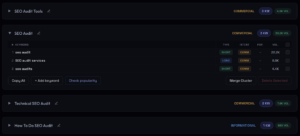
Same head term, four result pages. The volume column is why the informational one comes last.
Within a cluster the variants don’t each get a URL. The head term is the primary keyword; it takes the title, the H1 and the URL. “Cost,” “checklist,” “examples,” “template” are the secondary keywords, and they usually live as H2 blocks inside the page that owns the intent, each in the format the SERP shows for that variant: a table for cost, a list for checklist, a definition block for “what is.” The long tail under those needs no block at all. A variant becomes its own page only when its SERP is a different set of URLs — which is also the whole pillar-and-supporting question: the pillar owns the head intent, supporting pages own the intents whose SERPs split off from it, and a “supporting page” that shares the pillar’s result page is a section of the pillar. Writing a page per variant is how a site ends up with fourteen pages answering one question and none of them ranking.
Step 2. Read the SERP: which page type the intent accepts
Before an intent gets a URL, its SERP says what kind of page it will accept, and a page of another format doesn’t get in. The intent labels most tools attach, informational, commercial, transactional, navigational, are where I start and too coarse to build from: “commercial” covers a SERP of agency service pages and a SERP of comparison tables, and those are different pages with different blocks. What I map from is what the top ten is made of.
| What dominates the top ten | Page that can rank | Page that won’t |
|---|---|---|
| Service pages, agencies | Your service page | A guide, however good |
| Step-by-step guides, checklists | An article with a checklist block | A service page with a paragraph of text |
| Tools, calculators, free checkers | A tool page | An article about how tools work |
| Comparisons, “vs”, alternatives | A comparison page with a table | Your product page |
| Marketplaces, review platforms | Usually nothing on your domain; the listing on theirs | Anything |
The marketplace row saves the most budget. When a SERP is G2, Capterra and two marketplaces, the intent isn’t yours to rank for on your own domain, and the plan says so instead of scheduling a page that will sit at position 40 for a year. Forums and video set the ceiling: when Reddit, Quora or a video hold two or three of the top ten, as they do on this article’s own query, the target for an article is the slots they leave, and the plan says 5 to 9 rather than 1.
Step 3. Audit what already exists (existing sites only)
On a new site there is nothing to audit: clustering runs, the commercial clusters get the SERP read below, and the map follows. On a site with history, merges and deletions ship before the first new page. Otherwise the new page spends its first months competing with the one it was meant to replace, and in Search Console the query trades landing pages week to week. Three reads run before the keyword list touches anything.
The first is a content audit of the blog, and what the plan needs from it is one column: keep, rewrite, merge or delete per URL. A merge is a 301 to the strongest survivor, one to one, where stronger means more impressions on the shared queries over the last twelve months and, second, more referring domains. The ways a merge redirect passes nothing are in the 301 redirect piece; the short version is that the homepage is never the target. Near-duplicates the business has to keep, regional variants for instance, get a canonical, because noindex takes the page’s links out with the page.
The second is an overlap check on what’s already published, run on the topical map: which pairs of articles sit too close together, which is cannibalization before it shows in any report, and which article sits far from everything else on the site. A far one is either a focus mistake or the seed of a cluster, and if it’s a seed, the cluster grows around it.
The third is the commercial pages against their SERPs. For every commercial cluster, the top ten gets read as a set of blocks: which of them carry pricing, a comparison table, a calculator, specs, reviews, a location grid, a FAQ, and which block none of them has. The output per page is two short lists, the blocks the page needs for parity and the one or two it can own. That is the commercial audit, and it is the one read a new site runs too, before the service and category pages are designed, because the blocks have to exist in the template before anyone writes into them. On a build, its output and the topical map are the input to the architecture, rendering and CMS decisions made before the first line of code.
Half the existing sites I see can’t be rebuilt, and this case appears in no guide. The client has a template, a design, and a development queue that isn’t taking SEO tickets this year. What’s left is the text layer of the existing pages: entities, coverage, titles, H1 and H2, internal links. That is a ceiling, and the audit should say where it is. Some commercial clusters can’t be closed without a block the template doesn’t have. Those go to the blog as an interim page, or they aren’t taken, and the plan lists them by name.
THE TWO SEQUENCES
New site: cluster → SERP read → commercial pages against the SERP + topical map → keyword mapping → build.
Existing site: content audit → keep / rewrite / merge / delete → cluster against what’s left → commercial pages against the SERP → keyword mapping → build. If the template is frozen: the same, plus a written list of clusters the template can’t serve.
Step 4. Keyword mapping: one intent, one URL
The keyword mapping table is the shortest document in the process, the whole of what keyword research turns into, and everything else gets checked against it. One row per intent. The columns: cluster, intent, page type from the SERP read, URL (existing or to be created), role, priority. When two intents land on the same existing URL, that’s a merge or a split to decide now. When a new URL lands next to an existing one that already ranks for half the cluster, that’s cannibalization caught before anything is written. A content gap is a row whose URL column is empty.
Ours, for the audit cluster on neon-tm.com, looks like this:
| Intent | SERP format | URL | Role |
|---|---|---|---|
| seo audit services | service pages | /seo-audit/ | commercial |
| b2b seo audit | service pages + guides | /b2b-seo-audit/ + /insights/b2b-seo-audit-diagnosis/ | commercial + supporting |
| technical seo audit | guides, tool pages | /insights/technical-seo-audit-guide/ | pillar |
| enterprise seo audit | guides + service pages | /insights/enterprise-seo-audit-guide/ | supporting |
| 301 redirect seo penalty | short FAQ essays | /insights/301-redirect-seo-penalty/ | supporting |
The templates people download for this add a dozen more columns. I haven’t seen one of them change a decision.
Step 5. Prioritize by distance to revenue, not volume
A cluster of forty phrasings at 50 searches each is a 2,000-search page, and it sits below a single 800-search keyword in every tool’s sort. Volume gets read at the cluster level, after clustering, or it gets read wrong. Keyword difficulty is a backlink proxy: a KD of 60 over ten thin pages is a softer SERP than a KD of 30 over three deep ones, the number is built differently by every tool, and it’s comparable inside one tool and nowhere else. A starting filter.
Priority is the column people skip, and it decides the first quarter. Volume doesn’t set it. Distance to revenue does, and distance to a page that already ranks. A commercial cluster with a page sitting at position 12 comes before a big informational cluster with nothing behind it, because the first needs a push and the second needs a year. Within the blog, the pillar gets written first only when nothing supporting exists yet; on a site that already has three supporting articles and no pillar, the pillar is the gap and goes first.
The practical way to prioritize is three tiers. Striking distance first: existing pages at positions 5 to 20 on queries with any volume, because a link and a block move them in weeks. In Search Console that’s the Performance report over the last 28 days, position greater than 4 and less than 21, sorted by impressions, with a floor I set at 50 impressions on a small site and 200 on a large one; what’s left is pages Google already shows and nobody clicks. Then commercial intents with a SERP the site’s page type can enter. Then everything informational, in the order the topical map gives: a keyword list schedules the biggest cluster first, and the map can put a one-page topic ahead of it when that topic is what the site is supposed to be about. A cluster that lands in none of the three gets written down and not scheduled. Those three tiers, with dates against them, are the content calendar; there’s no separate document. Backlinks sit outside it. The order assumes the domain’s link profile is what it is, and where a cluster needs links the site doesn’t have, the row says so and the cluster waits.
Step 6. Brief, write, link
Every page in the table gets a brief before a word is written. The first layer is the coverage the SERP expects: the sub-questions a page about this intent has to answer, taken from the H2s of the top ten and the People Also Ask box, one H2 per sub-question, each in the format the SERP shows for it. Six to eight per intent; more than that and it’s two intents. The second layer is the one thing the page adds that the ranking set doesn’t have, and it’s named up front: the screenshot that will be in the page, the number from a report, the case with a date. If the brief can’t name one, the page waits. A case invented to fill the slot is assembled from what’s already in the top ten, so it reads as an echo. How the gain gets scored against the SERP before writing is its own article.
On-page optimization is short. The primary keyword in the title and the H1, the secondary ones in the H2s where they already are, a title that isn’t the H1, a URL that is the query and nothing else.
Internal links run in three directions, and crawlers report one. Supporting article to pillar and back. Article to the commercial page it feeds, one or two contextual links inside the text where the reader is ready to ask for the service, never a banner. And commercial page to the article that answers the question a buyer has before the form, which is the direction that gets built least, because service pages are written by a different team from the blog. The anchor is the target page’s primary keyword or a plain phrase around it, never “read more,” and the link sits where a reader would click it. A page linked only from navigation is reachable; a contextual link is what tells Google what the page is about.
Then the sitemap picks the URL up, Request Indexing gets this week’s pages fetched the same day (the quota is a handful of URLs per property), and seven to fourteen days later each new URL gets read in the Pages report; the technical SEO audit guide walks each status to its cause.
Step 7. Track the cluster in Search Console
An article’s Search Console line is noise for the first two months. The cluster’s line isn’t. I filter the Performance report by the cluster’s folder or slug pattern and read impressions, clicks and position for the cluster as one object, week over week, for 30 to 60 days before touching anything. Impressions and clicks first, position last: position in that report is an average across pages, so a cluster at “position 8” can be one page at 3 and four pages at 12.
Titles and descriptions get rewritten first, against the queries that already bring impressions and low click-through; those are how people phrase it, and they rarely match the brief. Then the cluster’s striking-distance pages get the push: a contextual link from the strongest page in the cluster, one pass on the block that answers the query, nothing else. Rank tracking outside Search Console is optional at this stage. The impressions column already says which queries the page is a candidate for, and a tracker adds a daily number to a page that hasn’t settled.
Every quarter the cluster gets the same reads as a stranger’s site, and the keyword research gets rerun for it, because the query variants move: which articles decayed against their own peak, which two now answer one intent, which fact is a year old with a newer one available. A refresh is the brief again — three things that weren’t true a year ago, or the page doesn’t get a new dateModified. A site that was new when the plan was written is an existing site twelve months later, and from then on it runs that branch.
Why researched keywords don’t rank
Most of the keyword research I’m handed comes with a previous attempt attached. The pages exist and the rankings don’t, and it’s usually one of four causes, two of which show up under a named status in Search Console.
| What was done | Why it doesn’t rank | What instead |
|---|---|---|
| A page per keyword variant | Fourteen pages answer one intent and split it fourteen ways; Google picks one and buries the rest under Duplicate, Google chose different canonical than user | One page per intent, variants as H2 blocks; merge the rest with 301s |
| The right intent in the wrong format | A guide on a SERP of service pages, a service page on a SERP of guides; indexed, and never in the top ten | Read the SERP before mapping; build the page type it shows |
| Order set by volume | The biggest informational cluster goes first, needs a year, and the quarter ends with nothing moved | Striking distance, then commercial, then informational by map order |
| A page that restates the top ten | Crawled – currently not indexed, or indexed at position 60 with nothing to distinguish it from the pages above | A gain named in the brief before writing |
And one that isn’t a mistake: a page younger than six weeks on a domain that was rebuilt this year, sitting at position 80 or 90, or getting no impressions at all. On a young domain that is age, and the check is impressions rather than position. If the page is getting impressions on the queries it was built for, the fix is waiting. If the impressions come from a neighbouring topic, or there are none after the first few days, the likelier reading is that the page is wider than its query: a dozen intents under one URL, so Google tried it on the head term and found no query it was the best answer for. The fix there is cutting the page down to the intent in its title and moving the rest to their own URLs.
Open question: how many articles a cluster needs
The number everyone asks for is how many articles a cluster needs before the site reads as an authority on the topic. Five? Fifteen? Does one page that ranks count for more than ten that don’t? I don’t have it, and I haven’t seen anyone who does. The nearest thing to a number I can defend is gain per page, measured against that page’s own SERP. If someone publishes a controlled test, same site, two clusters, one padded to twenty restatements and one held to five pages with measured gain, I’d read it before I believed any threshold.
By 2028 I’d expect the mapping table and the per-page gain score to be what a content plan is, one row per intent and one number per page, and “publish 40 articles this quarter” to read the way “build 500 backlinks” reads now. The sequence above, from the audit to the map to the brief, is how our SEO service turns keyword research into pages.