
A technical SEO audit is a review of whether a search engine can discover, crawl, render, index and retrieve the URLs that matter on a site, and of how efficiently it does so. The crawl-based checks (robots rules, status codes, canonicals, page speed) are the easy part; any site-audit tool runs them in a click. The audit is the reading that follows: which flagged issues stop Google on the path from discovery to retrieval, which are noise, and what the evidence is for each.
The finding that shows why the two are different things comes up on JavaScript sites more than anywhere else. A category template drops out of the index and the crawl shows nothing wrong with it: 200 status, self-canonical, in the sitemap, linked from the menu. The cause is a bundle that injects the product grid after load, so Googlebot has been indexing the frame around the grid. A raw-HTML crawl doesn’t flag it, because it reads the file the server sent, and that file is fine. A technical SEO audit that catches it runs in the order the index is built, seven steps, with the Search Console statuses, crawler filters and document limits named at each one, and ends in a report format a developer can act on.
What a technical SEO audit covers, when to run one, and what you need
A technical SEO audit asks one question six ways: can the engine discover, crawl, render, index, understand and retrieve the pages you need it to? Every issue a crawler flags is a symptom of a failure at one of those six points: undiscovered (the engine never finds the URL), uncrawlable (finds it, can’t fetch it), unrenderable (fetches the file, can’t build the page), unindexable (renders it, doesn’t grant it a place), misunderstood (indexes it as the wrong thing or as a copy), inefficient (does all of the above and spends so much effort on junk URLs that the important ones wait weeks). Filed against those six, a long issue list reorganizes itself: most of the reds turn out to be cosmetic, and a few yellows turn out to be the reason a template is invisible. The tables below carry the state as a column.
Scope: this is the machine-access layer. Whether the pages deserve to rank once indexed, demand, content depth, authority, is a different audit, and the technical audit assumes that question is handled elsewhere.
Four things have to be in hand before the reading starts: owner access to Search Console, because the API limits below are per verified property; a month of raw server logs; a full crawl with JavaScript rendering on; and the site’s own list of URLs that carry revenue or leads, because impact is weighted by that list and nothing in a crawl can supply it.
A full technical SEO audit is due after any migration, redesign or platform change, when the Pages report shows a template moving into an excluded status, and when new content takes weeks to appear in the index. A drop with a date on it is a different procedure, the rankings loss audit, which rules causes out in order of cost. Between those events the work is a recheck on three cadences: the Pages report by template, monthly; a rendered crawl after any deploy that touches a template; and the log split, quarterly, on sites where crawl budget is a live constraint.
Step 1. Discovery audit: sitemap, internal links, orphans and crawl depth
The discovery step of a technical SEO audit is where the path starts, and it fails more silently than anything downstream, because an undiscovered page throws no error. Google finds URLs three ways: by following links, by reading the sitemap, and from external links. Internal links do two jobs at once. They are the roads the crawler travels, and they are votes that tell the engine which pages you consider important.
Orphans are discovery’s plainest failure: indexable, revenue-carrying URLs with no internal link pointing at them, so the crawler has no path to them. They surface where a URL sits in the sitemap or the logs and has no inlink in the crawl, which in Screaming Frog is the filter Inlinks = 0 after the sitemap and the log file have been fed in as URL sources.
Crawl depth is the number of clicks from the homepage to a page, and a rough proxy for how the engine weighs it: the deeper it sits, the less often it is crawled and the less authority flows to it. A proxy, because Google also enters through the sitemap and through external links, so a page four clicks deep with a strong external link is less buried than the number says. One correction I apply on commercial sites: the homepage is the wrong origin. On an ecommerce or multi-service site the entry points are the category and service pages, so I read depth from the top-level category as well as from the home, and a product that is six clicks from the homepage and two from its category is not the problem the site-wide histogram makes it look like. The product that is four clicks from its own category is.
WHAT A SITEMAP DOES
A URL in the XML sitemap tells Google the URL exists and you’d like it discovered, a suggestion for the discovery stage. Google decides indexing on its own. Of the sitemap’s fields, Google’s sitemap documentation says it reads lastmod if it is consistently accurate and ignores changefreq and priority. The hard limits are 50,000 URLs and 50 MB uncompressed per file; past that you need an index file. A sitemap full of URLs you’ve since deleted, redirected or noindexed feeds the discovery stage bad information and spends crawl on dead ends.
The sitemap gets validated URL by URL against live status: every URL in it returns 200 and deserves to be there. A sitemap where a third of the URLs are redirects, 404s or noindexed pages points the crawler at things that waste its visit, and a sitemap that declares one count while the index holds a smaller one is a gap that is either pages Google refused or pages you never meant to submit. Either direction is a finding, and it gets read again at Step 4.
Pagination is discovery’s special case: rel="next" has been unsupported since 2019, so only an <a href> to page two makes page two exist. Infinite scroll with no paginated URLs beneath it leaves everything past the first screen undiscoverable, which is where Step 3 picks it up. The output of this step is the list of revenue URLs that are orphaned or buried, ranked by how much they matter.
Step 2. Crawl audit: robots.txt, status codes, redirects, crawl budget and logs
A technical SEO audit reads crawlability as two questions the tools tend to merge. First, can Googlebot reach the URL at all: is it outside every Disallow in robots.txt, and does it answer with a status the crawler can use. Second, once reachable, is the crawler’s effort being spent on it or burned elsewhere. A site can be perfectly crawlable in the first sense and starved in the second.
The first-sense failures cluster in a few shapes. A robots.txt rule blocking a directory someone forgot was important, a staging rule that shipped to production, a Disallow written for one path that catches three. And a block on the CSS, JavaScript or image paths the page needs to render, which doesn’t stop the crawl and does break Step 3.
Status codes and redirect chains
Status codes are the crawler’s first read on every URL, and the patterns matter more than any single code. A wall of 404s where content used to live means links and ranking history dead-ending into nothing. Redirect chains and loops: A to B to C to D. Gary Illyes said in 2016 that 3xx redirects no longer lose PageRank, so the cost of a chain sits elsewhere: Google’s documentation says Googlebot follows up to ten hops and then gives up, every hop is a fetch spent on nothing, and a chain built over three migrations usually has a loop or a 404 somewhere in the middle that nobody has walked. 404 against 410: John Mueller has said Google treats them nearly alike, with 410 dropping a little faster, so the routing decision matters and the code follows. The work is the full status-code map from the crawl, every redirect traced to its final destination.
Crawl budget and crawl traps
CRAWL BUDGET, AS GOOGLE DEFINES IT
Google allots each site a rough amount of crawler time and requests and spends it. Its crawl-budget guidance says the budget matters above roughly a million pages that change weekly, or ten thousand that change daily, or on any site where Search Console shows a large share of URLs as Discovered – currently not indexed. The rewrite of that guidance published on 22 July 2026 states two things in so many words: every site starts on the same conservative default limit, which grows only as the server proves it can take more, and “the crawl capacity limit is shared across all crawlers”, so a heavy AdsBot run is spending Googlebot’s allowance.
Crawl traps are infinite URL spaces the crawler never climbs out of, and on larger sites the faceted navigation is the one that does the damage: filters multiplied into millions of near-duplicate URLs while the revenue pages wait. Which facets deserve a page is a revenue call that belongs to the ecommerce SEO audit; the concern in a technical audit is mechanical, whether the explosion is eating the crawl.
Reading Crawl stats three ways
I read crawlability from a full-site crawl segmented by URL type (templates, parameters, facets, pagination), set against Search Console’s Crawl stats report. Crawl stats splits Googlebot’s requests three ways. By purpose: a mature site whose crawl is still mostly “discovery” has a crawler that keeps finding URLs it didn’t know about, and on a site that hasn’t grown, those are traps. By response: the share of requests answered with 3xx, 404 and 5xx is crawl spent on nothing, and after a couple of migrations it often runs into double digits. By Googlebot type: since the July rewrite this is where the shared budget shows, with AdsBot and the image fetcher drawing from the same pool as Googlebot Smartphone. Traps surface in the crawl as URL patterns that balloon far past the number of pages the site has. That locates the break; rewriting the robots rules or the facet routing is the build work that follows.
Server logs
Server logs are the record of every request Googlebot made, every URL it fetched and every status it got back, in order. Everything else in this step is inference from reading the site the way a crawler would; the logs replace the inference with the record. Which pages Googlebot crawls often and which it hasn’t touched in months. What share of its requests hit facet grids, parameter junk and redirect chains, and what share hit the URLs that carry revenue. What share got a 304 Not Modified back, which on most sites is zero, and that one number is the crawl-efficiency finding: Google’s guidance describes answering a conditional request with 304 when the page hasn’t changed, so the fetch costs almost nothing, and that needs a usable Last-Modified or ETag on the template, which most CMS output doesn’t carry.
Before the reading, verify the Googlebot hits against Google’s published ranges, the googlebot.json file under developers.google.com or a reverse DNS to googlebot.com, because spoofed Googlebot traffic is common enough to distort the split. And separate Googlebot from the AI crawlers, which fetch far more per visitor they send back (Cloudflare Radar’s crawl-to-refer ratios for the 28 days to 21 July 2026 put Google at 4.6 and the large AI crawlers in the hundreds and thousands) and which, on a site with a strict allowance, are spending the server capacity that Googlebot’s own limit responds to. With those two done, the number is a share of verified Googlebot requests over a month that hit URLs you don’t want indexed, and the URLs have names.
Step 3. Render audit: what Googlebot builds from the JavaScript
Rendering is the step between fetching a file and reading a page, and on JavaScript sites the two can be different documents; the render step of a technical SEO audit asks which of the two Google indexed. When a site is built in React, Vue, Angular or any similar framework, the server often ships a near-empty HTML shell, a <div id="root"> and a bundle of scripts, and the browser runs the scripts, fetches the data and builds the page. That step is hydration; the raw file is an empty frame and the content is poured in afterward.
Google renders JavaScript on a separate pass with an evergreen Chromium. It fetches the raw HTML first, queues the page for rendering, and comes back later to run the scripts. In that gap, or if a script errors, or if the content depends on an event the crawler never fires, the rendered page can come back missing the things you need indexed. Google’s JavaScript documentation says the renderer doesn’t scroll, click, type or swipe, doesn’t keep cookies or storage between loads, declines permission prompts and doesn’t run service workers; practitioners’ tests show it renders with a tall viewport, which is why lazy-loading built on IntersectionObserver usually fires while anything behind a scroll event or a “Load more” button never exists for it.
| Renders for Googlebot | Doesn’t |
|---|---|
| Accordions and tabs toggled with CSS or a class change, content already in the DOM | Content fetched on tap or click (“load reviews”, “show specs”, “view more”) |
Images with native loading="lazy", or a JS lazy-loader with a <noscript><img> fallback | Lazy loading tied to scroll events. Nothing scrolls, nothing loads |
Content lazy-loaded via IntersectionObserver; the tall viewport makes below-the-fold elements intersect | Infinite scroll without paginated URLs behind it |
Routing with history.pushState, as long as every route is a real URL that returns the content on a fresh request | Hydration that throws and leaves an empty shell. Server-rendered HTML with a hydration error still gets indexed as that HTML; a client-only app with one gets indexed as nothing |
| JavaScript redirects that fire on load | Client-side redirects that fire after a delay |
The failures I look for: content in the rendered DOM and absent from the raw HTML. Internal links injected by JavaScript with no <a href> underneath, so the crawler sees no path onward and discovery dies one level deep. Metadata set by script after load (titles, canonicals, meta robots), where the crawler may read one thing and the user another; Google’s guidance says to avoid changing the canonical with JavaScript at all. And resources the renderer couldn’t load: a stylesheet or script under a blocked path, or a changed app.js shipped under the same filename, because Google’s rendering service caches CSS and JavaScript aggressively and ignores your cache headers while doing it. Fingerprinted filenames (app.3f2a1c.js) are the fix, and any modern bundler does it by default.
I catch it by crawling the page twice, once reading raw HTML and once with rendering on, and diffing the two. In Screaming Frog that is JavaScript rendering mode with both the original and rendered HTML stored, and the JavaScript tab does the diff: Contains JavaScript Content, Contains JavaScript Links, Canonical Only in Rendered HTML, Noindex Only in Original HTML, Page Title Updated by JavaScript. Each filter is one of the failures above, counted per template. For a single URL the same check is Search Console’s URL Inspection: live test, the HTML tab against the screenshot, and “Page resources” under More info, where every stylesheet or script listed as blocked or errored is a resource the renderer went without.
Step 4. Index audit: noindex, canonical, duplicates and soft 404
Crawling is whether Googlebot can fetch the URL. Indexing is whether Google grants it an independent place in the results. The index audit reads the layer between the two, every page that gets fetched, considered and dropped, which no crawl-only check sees. Search Console names the gap in specific statuses, and each one is a different diagnosis pointing at a different step of the technical SEO audit.
| Search Console status | What it means | Failure state | Where the fix lives |
|---|---|---|---|
Discovered – currently not indexed | Google knows the URL and hasn’t fetched it; the crawler is rationing | Inefficient | Step 2, Step 7, logs |
Crawled – currently not indexed | Google fetched it, looked, and declined: quality or duplication | Unindexable | Content audit; canonicalization below |
Duplicate, Google chose different canonical than user | Your canonical tag was overruled; Google picked another URL | Misunderstood | URL architecture, below |
Duplicate without user-selected canonical | No canonical at all on a page Google sees as a copy | Misunderstood | URL architecture, below |
Indexed, though blocked by robots.txt | Blocked after it was indexed; the noindex can’t be read | Uncrawlable | The trap below |
Excluded by 'noindex' tag | A noindex is doing its job; check it was meant to | Unindexable | Directives, this step |
Soft 404 | Returns 200; Google read it as empty | Unindexable | Step 2 status map, Step 3 render |
Page with redirect | The URL redirects; the destination is what gets judged | — | Step 2, Step 1 sitemap |
The mechanisms behind the statuses. A noindex tag doing its job somewhere nobody meant it to, applied site-wide during a redesign and never lifted, or set in an HTTP header as X-Robots-Tag, invisible in the page source; the crawl’s Directives tab and the response headers both have to be read. A canonical tag pointing the wrong way, telling Google the real page is a duplicate of a weaker one, so the weaker one ranks and the real one is suppressed; Google’s documentation calls the canonical a hint, and when it overrules you the page lands in the third row above. Soft 404s: pages that return 200 OK while showing an empty search result, a “no products found,” a placeholder. Google’s soft-404 handling goes by what the page shows, whatever the status code says, so the URL is judged worthless and dropped.
Where duplicate URLs come from, and which signal wins
Sites generate several addresses for one thing (tracking and sort parameters, trailing-slash and case variants, http/https/www), and Google has to guess which you meant; when it guesses, it sometimes keeps the parameter-stamped version and buries the clean one, and every duplicate splits the signal that should have pooled on one URL.
Canonicalization is the set of signals that resolve the ambiguity: the canonical tag, redirects, internal linking, the sitemap. Google’s documentation lists the tag as one signal among several and calls it a hint, and in practice it is the weakest of the four, because it is the only one the crawler can disregard without consequence. Internal links are the strongest, because they are what the crawler follows. So the fix order for a canonical conflict is links first, sitemap second, tag last; a site that changes the tag and leaves ten thousand internal links pointing at the parameter version has changed nothing Google acts on. The contradiction I see most is a tag that says one URL while the internal links, the sitemap and the redirects vote another, so Google gets four instructions and follows none of them reliably.
I map the URL space from the crawl, flag the duplication patterns, and check Google’s verdict against the site’s in two places: the Duplicate, Google chose different canonical than user status, and the “Google-selected canonical” field in URL Inspection on a sample of each template. Two URLs from the same site ranking, badly, for the same term is how it surfaces in the results.
Index bloat and the index check
Two failures only show up when you compare lists. Index bloat: thousands of thin, auto-generated URLs indexed that never should have been. And the sitemap-to-index gap from Step 1. None of this is visible from what the site intends; you have to read what Google holds. A site: search won’t give a straight count, and on a large site it can be off by an order of magnitude. The URL Inspection API is exact and capped at 2,000 requests a day per property, so on a large site I check class by class, sampled: a bulk index check across Google and Bing, template by template, reading live index status, so the picture is “of this class of page, here is the share that’s indexed,” set against what the site thinks it published. A class where the canonical or noindex on the page disagrees with what’s in the index is where the finding sits.
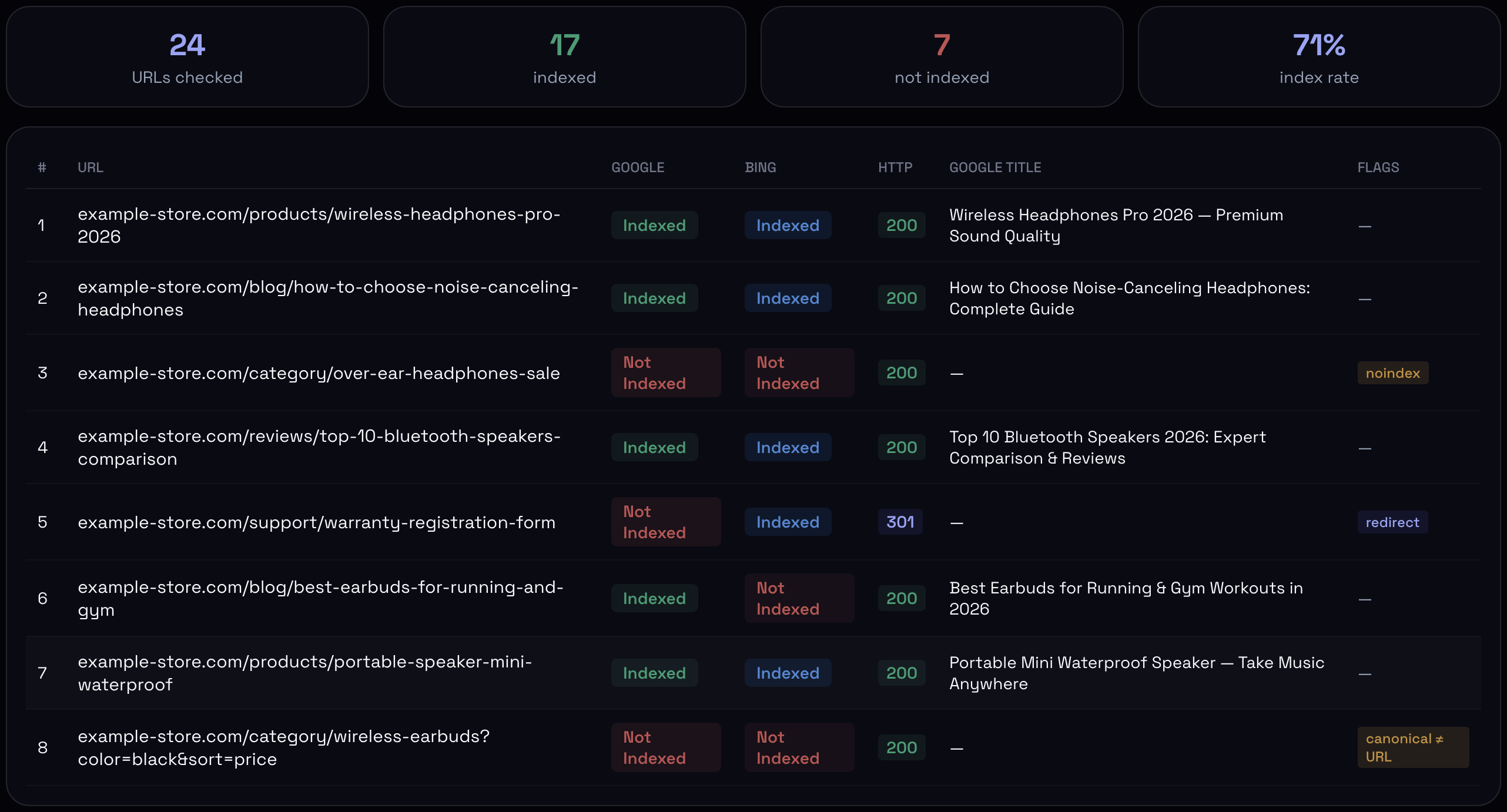
noindex, a URL that only 301s, a canonical pointing elsewhere.On very large sites the unit of analysis stops being the page and becomes the template, which is the ground of the enterprise SEO audit.
Step 5. Mobile audit: what Googlebot Smartphone gets
Since Google finished the move to mobile-first indexing (the last desktop-crawled sites were moved to the smartphone crawler on 5 July 2024), the mobile HTML is the indexed HTML, including for desktop searches. There is one index, and it was built from what Googlebot Smartphone fetched, which is why “mobile-friendly” in a technical SEO audit means one thing before it means layout: does the page the smartphone crawler receives contain everything the desktop page does? A site can pass every layout check and still hand Google half its content.
Parity breaks per template, and which mechanism did the hiding matters more than which block is missing. Content hidden with CSS is in the HTML and is indexed; content removed by a template condition is not in the HTML at all. In the page builder the two settings sit next to each other and look the same.
| “Hide on mobile” done as | In the crawled HTML? | Indexed? |
|---|---|---|
CSS class or media query (display: none) | Yes | Yes |
Template condition (Liquid {% if %}, PHP, server-side device rule) | No | No |
| Component mounted only above a breakpoint (React, Vue) | No (the renderer runs at mobile width) | No |
The read is URL Inspection → View crawled page → HTML, compared against a crawl run with the Googlebot Smartphone user agent and rendering on: word count on main, H1–H3 as the same elements and not only the same text, a[href] counts in the content and the navigation separately, same images and JSON-LD. Crawl stats → By Googlebot type should also show the Smartphone line dominating; a Desktop line anywhere near parity two years after the cutover means the server treats the two user agents differently. And a curl -A "<Googlebot Smartphone UA>" against the CDN hostname, not the origin, because CDNs that normalize the user agent into buckets can serve the crawler the desktop HTML from cache while every check you run from a phone passes. The per-template version of this step, with the viewport, configuration and UX items that belong to it, is the mobile SEO checklist.
Step 6. On-page technical SEO: titles, headings, structured data, hreflang, HTTPS and images
Most technical SEO audits start here, and the step belongs after the page is known to be discovered, fetched, rendered and indexed, because a title fix on a template Google isn’t indexing changes nothing. The checks are short and the crawl reports them in bulk.
Titles, descriptions and headings come out of the crawl’s Page Titles, Meta Description and H1 tabs as duplicates, missing and multiples per template, and the only ones worth a finding are the ones on templates that carry traffic; a missing description matters less than it looks, since Google rewrites it often enough that its main job is to be there. HTTPS: HTTP pages still resolving without a redirect, and HTTPS pages loading HTTP assets, split the URL space and show in the crawl’s Insecure Content report. Images: missing alt on content images, and image files that break or 404 after a migration, from the crawl’s Images tab. Hreflang, on sites with more than one market: reciprocal pairs, x-default, self-canonical on every copy, read in the crawl’s Hreflang tab and worked through in full in the international SEO audit.
Structured data
Structured data (JSON-LD, usually) tells the engine what the page is in terms it doesn’t have to infer, and gives the answer engines an entity to resolve.
Three checks here. Is the schema present on the templates where it matters, and is it valid; invalid JSON-LD is simply not parsed, so a template with a broken block has no structured data at all. Two validators, and they disagree on purpose: Google’s Rich Results Test checks only the types Google uses and says whether a rich result is possible; the Schema.org validator checks syntax against the whole vocabulary, and markup that passes one and fails the other is itself a finding. Does the marked-up data match the visible page, since schema claiming a price or a rating the page doesn’t show is what Google’s spammy structured markup manual action is for. And is the entity information consistent: does the Organization, author and product markup tell one story across the site or three. Organization markup is often missing or on the homepage only, and author Person markup with a sameAs to a profile is rarer still; adding both is the cheapest fix in the whole technical SEO audit.
Now that answers are assembled from passages, one more check moves into this step. Google’s documentation says AI Overviews and AI Mode draw on the same index as Search, that there is no special markup for them, and that the Google-Extended robots token controls Gemini training and grounding and has no effect on inclusion in AI Overviews. Retrievability is three questions already asked above: is the page indexable, is the passage in the raw HTML or only in the rendered DOM, and does it sit under a heading that says what it answers.
Step 7. Performance audit: Core Web Vitals on phones, and the crawl connection
Core Web Vitals are Google’s three measures of page experience, each with a threshold, plus a server-response metric that sits underneath all three. Google grades them at the 75th percentile of real Chrome sessions over a rolling 28-day window, and that field number, not a lab score, is what the technical SEO audit works from; INP replaced FID on 12 March 2024, and any audit that still names FID predates that.
| Metric | Good | Template that fails it most | First fix |
|---|---|---|---|
| Largest Contentful Paint | ≤ 2.5 s | Article and landing pages with a hero image; a desktop-sized image on a 390 px viewport | Find the LCP element in DevTools; fetchpriority="high"; a mobile source in srcset; never lazy-load it |
| Interaction to Next Paint | ≤ 200 ms | Commercial templates with a tag manager; “delay JS until interaction” plugins that make the first tap pay for every script | Performance panel with 4× CPU throttling; remove or defer the third party |
| Cumulative Layout Shift | ≤ 0.1 | Listing pages with unsized images and injected banners | Dimensions on every image; reserved slot height; consent banner as overlay |
| Time to First Byte | ≤ 800 ms | Any uncached dynamic template | Cache the template; fix the slow query behind it |
Mobile fails first. Same page, same code, and the phone build of the Chrome UX Report is red while desktop is green, because a mid-range Android on a cell connection has a fraction of the CPU and a multiple of the latency.
CrUX only holds numbers for URLs with enough traffic; on a long-tail template the per-URL data is empty, PageSpeed Insights falls back to origin-level figures, and a failing template hides behind a passing homepage. So I read per template, and per template means sampling: twenty URLs from each class through the CrUX API with the phone form factor, or the site’s own RUM. A single site-wide score is an average that hides which template is red.
Speed is also a crawl concern, and that reading is the one most performance reports leave out. A slow server response directly limits how many pages Googlebot fetches per visit; the crawler budgets time as well as requests, and Google’s crawl-budget guidance says outright that response speed and server errors are what move the crawl limit up or down. A TTFB finding on a template is therefore a Step 2 finding as well, and the 304 share from the logs is where the two meet.
The technical SEO audit report: issue, evidence, impact, fix, owner
A flat issue list sorted by severity is a crawler’s export, not a technical SEO audit report, and its severity ranking is close to meaningless, because the crawler has no idea which URLs touch the business. It flags a critical warning on a page with no traffic and a medium one on the template that carries the traffic, and hands you the dead page first. The report inverts that, and every finding carries five things.
- Issue. What’s wrong, in one line, tied to the step and the failure state it belongs to.
- Evidence. How it’s known: the crawl diff, the log segment, the index-check mismatch. The reading itself, reproducible.
- Impact. Severity re-weighted by which URLs it hits. A medium issue on the money template outranks a critical one on a page that was never going to rank.
- Fix. The correction, specific enough to ticket.
- Owner and recheck date. A robots rule is SEO’s, a rendering failure is engineering’s, a redirect chain belongs to whoever owns the server config. And a date to re-crawl and confirm the fix landed.
Written out, the finding from the opening example reads: Issue: category template indexed without the product grid (Step 3, unrenderable). Evidence: Contains JavaScript Content on every /category/ URL in the rendered crawl; URL Inspection shows the grid in the screenshot and not in the HTML. Impact: the whole category layer, and every product below it discoverable only through the sitemap. Fix: ship the grid in the server HTML or pre-render it; fingerprint the bundle. Owner: front-end; recheck 14 days after deploy. A finished report usually comes down to a handful of findings written like that, each on one of the seven steps, with the rest of the crawler’s list in an appendix.
Technical SEO audit checklist
One row per check, where to read it, what counts as a pass, and which of the three classes from the top of the page it falls into: a failure that blocks the index, one that costs crawl, or one that is cosmetic until the first two are clear. A site can pass every row and still have its best template sitting in Crawled – currently not indexed, and a site can fail three and rank, because the failures sat on pages without traffic; the step and the template decide which.
| Check | Where to read it | Passes when | Priority | Step |
|---|---|---|---|---|
| Orphan pages | Crawl with sitemap and logs as sources; Inlinks = 0 | No revenue URL without an internal link | blocks index | 1 |
| Crawl depth | Site Structure tab, per template, from home and from category | Money pages within three clicks of their category | costs crawl | 1 |
| Sitemap | Sitemaps report; every URL against live status | All 200, all indexable, lastmod accurate; under 50,000 / 50 MB per file | costs crawl | 1 |
| Pagination | Crawl: pages reachable only past page one | An <a href> to every page | blocks index | 1 |
| robots.txt | The file; URL Inspection → Page resources | Under 500 KB; no CSS, JS or image path blocked; no staging rule | blocks index | 2 |
| HTML size | Response size in the crawl | Under 15 MB, inlined assets included | blocks index | 2 |
| Status codes and chains | Response Codes; redirect chains report | No chain past two hops; no loop; 404 walls mapped | costs crawl | 2 |
| Crawl spend | Crawl stats by purpose, response, Googlebot type; verified logs | 3xx/4xx/5xx share in single digits; junk URL share named; 304 share above zero | costs crawl | 2 |
| Compression and protocol | Response headers; DevTools Protocol column | br or gzip; HTTP/2 or HTTP/3 (Googlebot has crawled over HTTP/2 since November 2020) | costs crawl | 2 |
| Raw vs rendered | JavaScript tab filters; URL Inspection HTML vs screenshot | Nothing indexable exists only after render | blocks index | 3 |
| Blocked resources, stale scripts | Page resources; build output | No resource blocked; filenames fingerprinted | blocks index | 3 |
| DOM size | Lighthouse: excessive DOM size | Under ~1,400 nodes on the template (Lighthouse’s error threshold) | cosmetic | 3 |
| Directives | Directives tab; X-Robots-Tag in headers | No noindex that wasn’t meant; never block and noindex the same URL | blocks index | 4 |
| Canonicals | Canonicals tab; URL Inspection Google-selected canonical | Self-referencing; links, sitemap and tag agree; Google agrees | blocks index | 4 |
| Index per template | Pages report by reason; bulk index check | Indexed share per class matches intent; no bloat | blocks index | 4 |
| Soft 404 | Pages report | Empty states return 404 or 410, or carry content | blocks index | 4 |
| Mobile parity | URL Inspection crawled HTML vs desktop crawl; Crawl stats by Googlebot type; curl with the smartphone UA | Same content, headings, links, JSON-LD; Smartphone line dominates | blocks index | 5 |
| Titles, descriptions, H1 | Page Titles, Meta Description, H1 tabs | Unique per page on traffic templates; one H1 | cosmetic | 6 |
| HTTPS and mixed content | Insecure Content report; DevTools Security | HTTP redirects; no HTTP assets on HTTPS pages | costs crawl | 6 |
| Hreflang | Hreflang tab | Return links, x-default, self-canonical on every copy | cosmetic | 6 |
| Structured data | Rich Results Test; Schema.org validator | Valid, matches the visible page, one Organization story | cosmetic | 6 |
| Core Web Vitals | Search Console CWV report; CrUX API per template, phone | LCP ≤ 2.5 s, INP ≤ 200 ms, CLS ≤ 0.1 at p75 on phones, per template | cosmetic | 7 |
| Server response | TTFB per template; Crawl stats 5xx share | TTFB ≤ 800 ms; no sustained 5xx | costs crawl | 7 |
Technical SEO audit FAQ
How is a technical SEO audit different from an SEO audit?
The technical SEO audit stops at whether the engine can reach, build, understand and retrieve the page; the full SEO audit adds whether the page deserves to rank once it is there. The two meet in one status: a page in Crawled – currently not indexed is a technical finding if the render diff shows the content missing, and a content finding if it doesn’t. If you want the seven steps above run on your own site, that is our SEO audit.
Can I run a technical SEO audit without a developer?
The reading, yes. Search Console, a crawler, the Rich Results Test and a log file are all readable without code, and the checklist above names where each check lives. Most of the fixes are template work: the render gap, the canonical rule, the redirect map, the INP source. Expect the audit to be yours and the tickets to be a developer’s, and expect the tickets to take longer than the audit did.
How long does Google take to render a JavaScript page?
Google’s last public figure is from 2019: Martin Splitt, at Google I/O, put the median time between crawl and render at about five seconds, with a tail into minutes. It hasn’t published a newer one, and I don’t have a measurement of my own that separates queue time from crawl interval, so the answer in 2026 is that nobody outside Google knows. The technical audit treats any content that exists only after render as at risk, however fast the queue happens to be on a given day.