Ecommerce SEO Audit Services for catalogs Google ranks wrong

Most audits check whether the store is healthy. This one checks whether Google reads it right: which page should win which search, and why the revenue pages don’t.

  • 3–4 wks, audit to prioritized roadmap
  • Healthy ≠ ranking, a working store can still rank wrong
  • Indexed ≠ searchable in the index, not in the results
  • Crawl Budget Analysis
  • Catalog Architecture
  • Faceted Navigation Audit
  • Product Lifecycle Equity
  • Revenue-Page Priority
  • Powered by Algorithm

Audit diagnostics built for catalog scale

Core Capabilities

The audit reads the store as Google crawls it: crawl budget and indexation, faceted navigation, category and product pages, product lifecycle, internal and external links. Each is read against search demand, Query → Intent → Entity → URL, so one commercial search has one page built to win it. Each finding comes with the URL list behind it.

Crawl Budget & Indexation
Technical SEO: parameter URLs, canonicals, pagination
Faceted Navigation Audit
Which facets deserve to exist in search
Category Architecture
Taxonomy depth, category page content & internal linking
PDP Quality & Uniqueness
Duplicate & manufacturer copy, attributes, schema
Catalog Cannibalization
One canonical destination per commercial intent
Product Lifecycle Equity
301/410 logic that preserves accumulated equity
Link Equity & Authority
Authority flow from homepage to money pages
SERP & AI Visibility
Clicks lost to SERP features & AI answers
Symptom → Diagnosis

Eight store symptoms we trace to the URL

01
Traffic Without Revenue
Symptom
“Traffic is growing, but sales aren't.”
+
01
The Real Problem
You rank for research queries (“how to choose”, “X vs Y”) that land on the blog. The “buy” and brand-plus-model queries that end in a cart land on a competitor's category page.
What We Check
Organic revenue by query, category and product; informational vs transactional split; which page each buying query lands on.
02
Indexed But Not Ranking
Symptom
“Our products are indexed, but don't rank.”
+
02
The Real Problem
Product pages run the manufacturer's feed text, the same as fifty other retailers. Google folds near-duplicates into one canonical, and it is rarely yours.
What We Check
Manufacturer copy matched against the web, attribute coverage per template, reviews, variants, Product and Offer schema.
03
Categories Don't Rank
Symptom
“Our category pages don't rank.”
+
03
The Real Problem
The category page is a grid with an H1. Nothing names the range or who it's for, no subcategory links, so only the title tag matches the query.
What We Check
Category-to-query mapping, text and entities on the page, subcategory architecture, internal links in, CollectionPage schema.
04
Crawl Waste
Symptom
“Google crawls URLs nobody searches for.”
+
04
The Real Problem
Sort, filter and session parameters create a URL per combination, with no canonical or robots rule. Crawl capacity is set per host, so new product pages wait.
What We Check
Crawlable vs indexed URLs from logs and Search Console, parameter patterns, orphan products, crawl depth.
05
Facet Explosion
Symptom
“Filters create more pages than our catalog.”
+
05
The Real Problem
Faceted navigation multiplies thousands of SKUs into hundreds of thousands of URLs, and the CMS ships them all open. Google's guidance says decide per facet; most stores never did.
What We Check
Which facet combinations have search demand behind them and deserve a static URL, and which only consume crawl and index capacity.
06
Buried Best-Sellers
Symptom
“Our best-sellers are buried four clicks deep.”
+
06
The Real Problem
Best-sellers sit on page 4 of a category or behind a filter, with no link from the homepage or the category top. Authority follows links, and nothing links to them.
What We Check
Click depth per product from the homepage, internal links into each best-seller, pagination and related-product blocks as link sources.
07
Lost Product Equity
Symptom
“Out-of-stock products destroy our SEO equity.”
+
07
The Real Problem
Discontinued products go 404 or 301 to the homepage. Google treats a redirect to an unrelated page as a soft 404, so earned links and rankings are dropped, not passed.
What We Check
In-stock → out → discontinued lifecycle: 301/410, keep-page, alternatives, preserved reviews & links.
08
Catalog Cannibalization
Symptom
“Multiple pages compete for the same search.”
+
08
The Real Problem
The same product set is reachable as a category, a filtered URL, a brand page and a tag. Google alternates between them and none holds the position.
What We Check
One canonical destination per intent, URL variants of one listing, category overlap, URLs swapping on a query in Search Console.
Proprietary Diagnostics & Continuous Access

Five reports from the audit, on your own login, on your own login

Standard tools sample a few hundred pages. Here the whole catalog is mapped on Algorithm, our own platform: category, filter and product URLs as they crawl, index and compete with each other. Your team gets a platform login during the audit and after it.
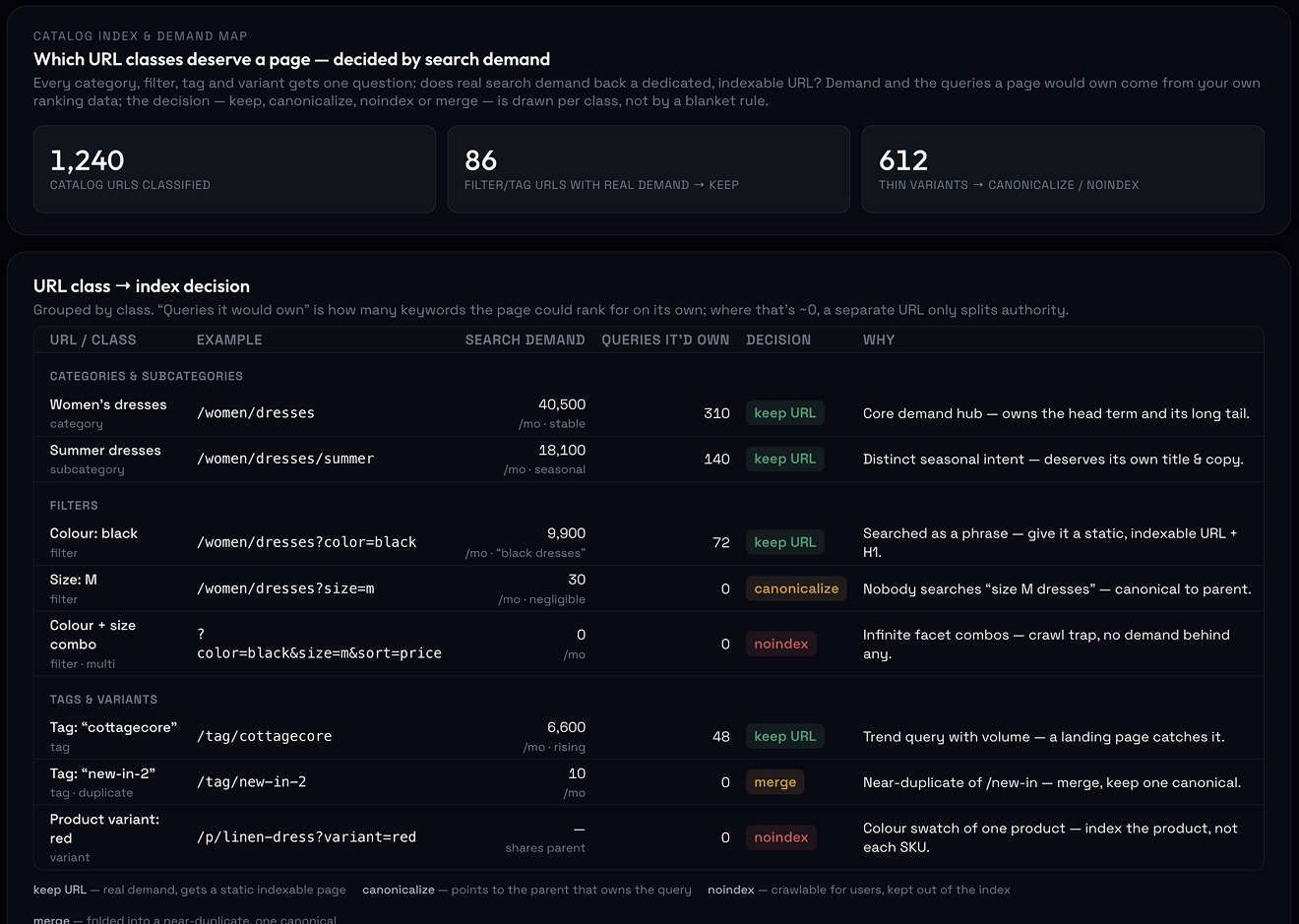
Catalog index and demand map — which filters deserve a URL, which URL owns each query
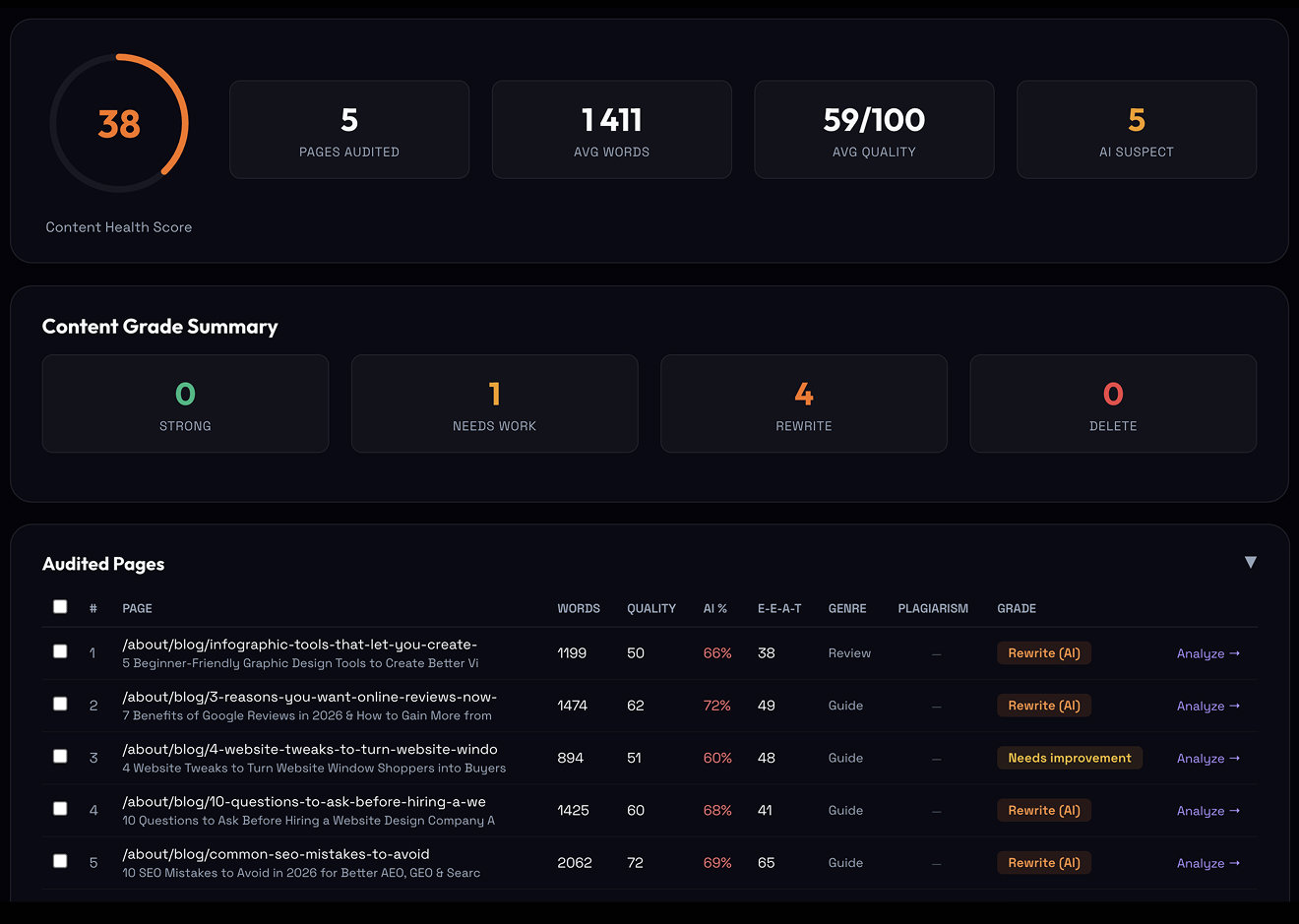
Content authenticity & E-E-A-T audit — AI likelihood, content quality and trust signals
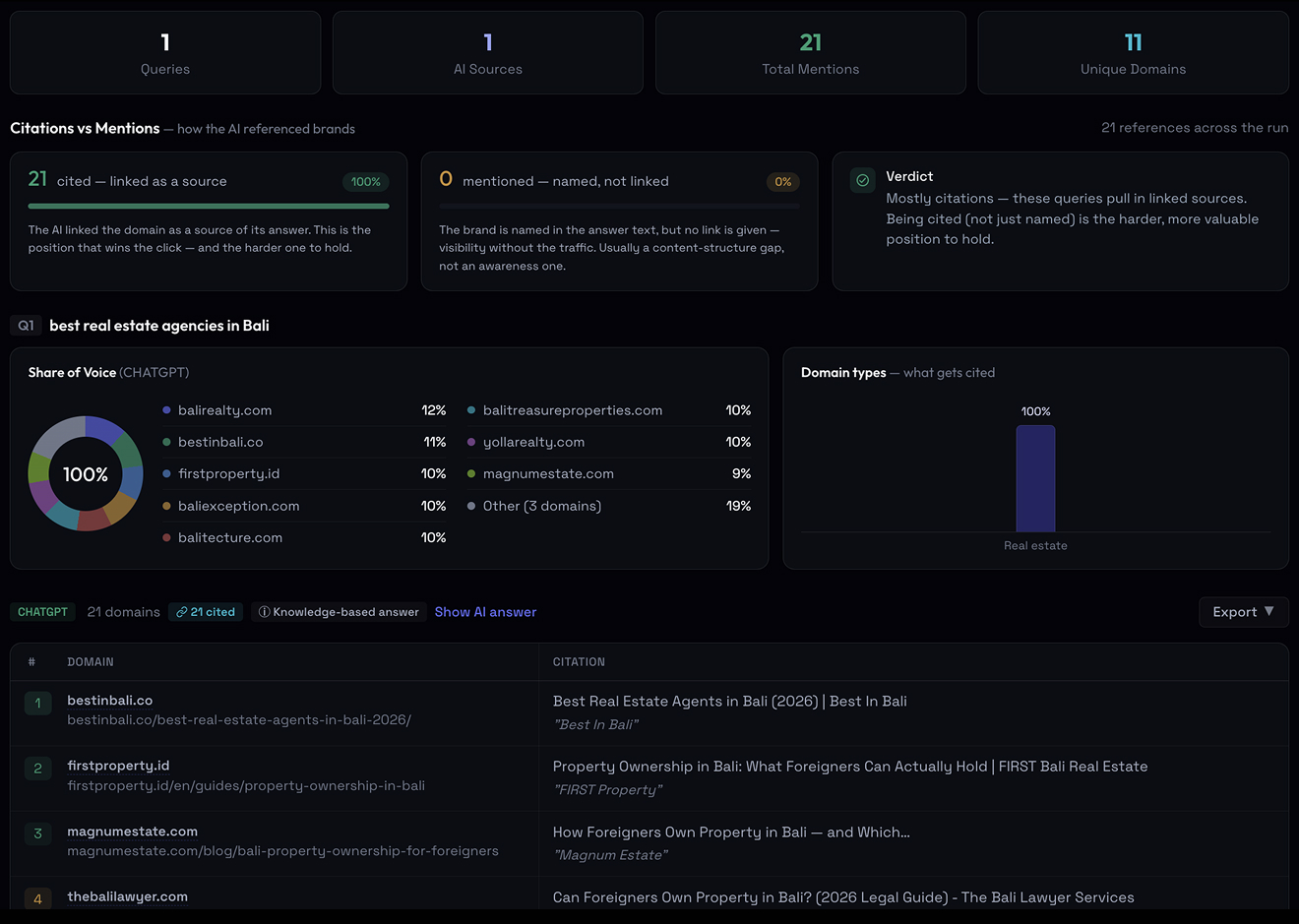
AI visibility diagnostics — share of voice and citation tracking across AI engines

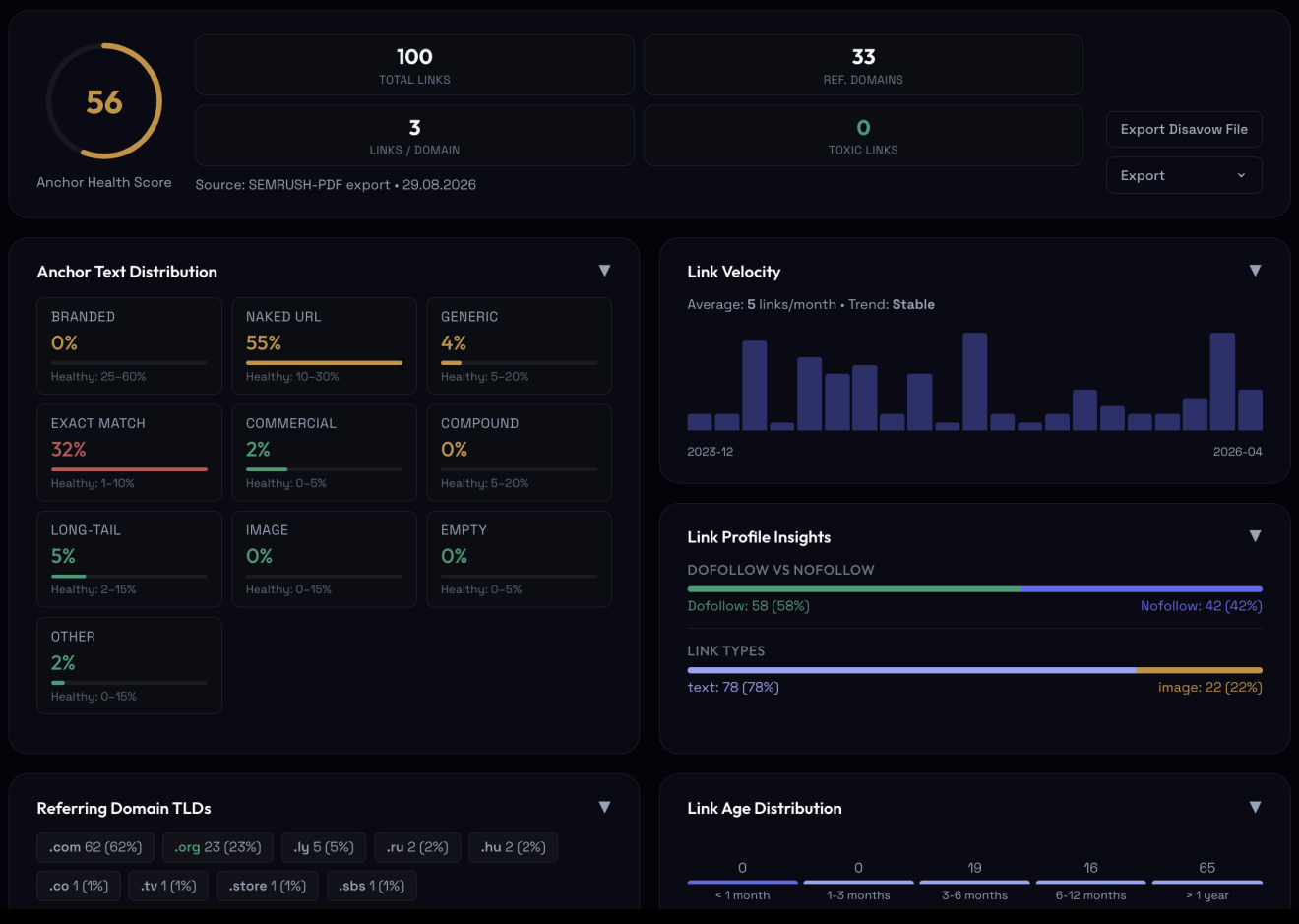
Link Equity & Toxicity

Store backlink profiles pool at the homepage. The audit maps whether any authority reaches the categories that sell, and which donors carry the signals Google discounts.

What you see
  • Which categories get authority, and which sell without any. External links per URL, where usually the homepage has them all, plus the internal donors that should feed each category, named.
  • Money-keyword anchors before they look bought. “Buy”, “cheap” and product-name anchors as a share of the profile, with spike dates. Store profiles cross the line fast.
  • Donors carrying the signals Google discounts. Coupon farms, paid-review hubs, network sites sharing hosting or ad IDs, flagged with what gave them away.
Internal donors are named with the anchor, so the fix is a list of links to add, category by category.

Catalog Index & Demand Map

Each URL class, categories, filters, tags, variants, gets one question: does it deserve its own place in the index? The dividing line is search demand, and we draw it per category.

What you see
  • Which filters and tags deserve their own URL. Filter and tag combinations with search demand get a static URL, title and description; the rest are canonicalized or closed. A named list per category.
  • Which URL should own each query. Categories, collections, filters and blog posts competing for one intent, sections duplicated between listings, variants multiplying near-duplicates, decided by meaning.
  • Crawl budget spent where it pays. Infinite filter, sort and pagination combinations, the URLs that trap crawlers with no demand behind them, closed off, so Google spends its crawl on the categories that rank.
The rule for each facet is written per category, with the URL pattern, so your CMS team gets an indexation ruleset and not a principle to interpret.

Content Authenticity & E-E-A-T

Product claims, specs and reviews are measured as citable facts, the source signals shopping SERPs and AI answers attribute.

What you see
  • Manufacturer copy and templated descriptions, by range. Product pages running feed text found elsewhere on the web, and AI-templated descriptions, ranked by how many products share the problem.
  • Where a number should replace an adjective. “Premium quality” convinces no engine and no shopper. The pages where a spec with a source would replace the adjective, listed.
  • Product and review schema markup that matches the page. Structured data validated per URL; the mismatches that cost rich results and Merchant Center free listings, named.
Manufacturer copy is matched against the web, so the share of duplicated PDPs is a number with the list behind it.

Full Coverage

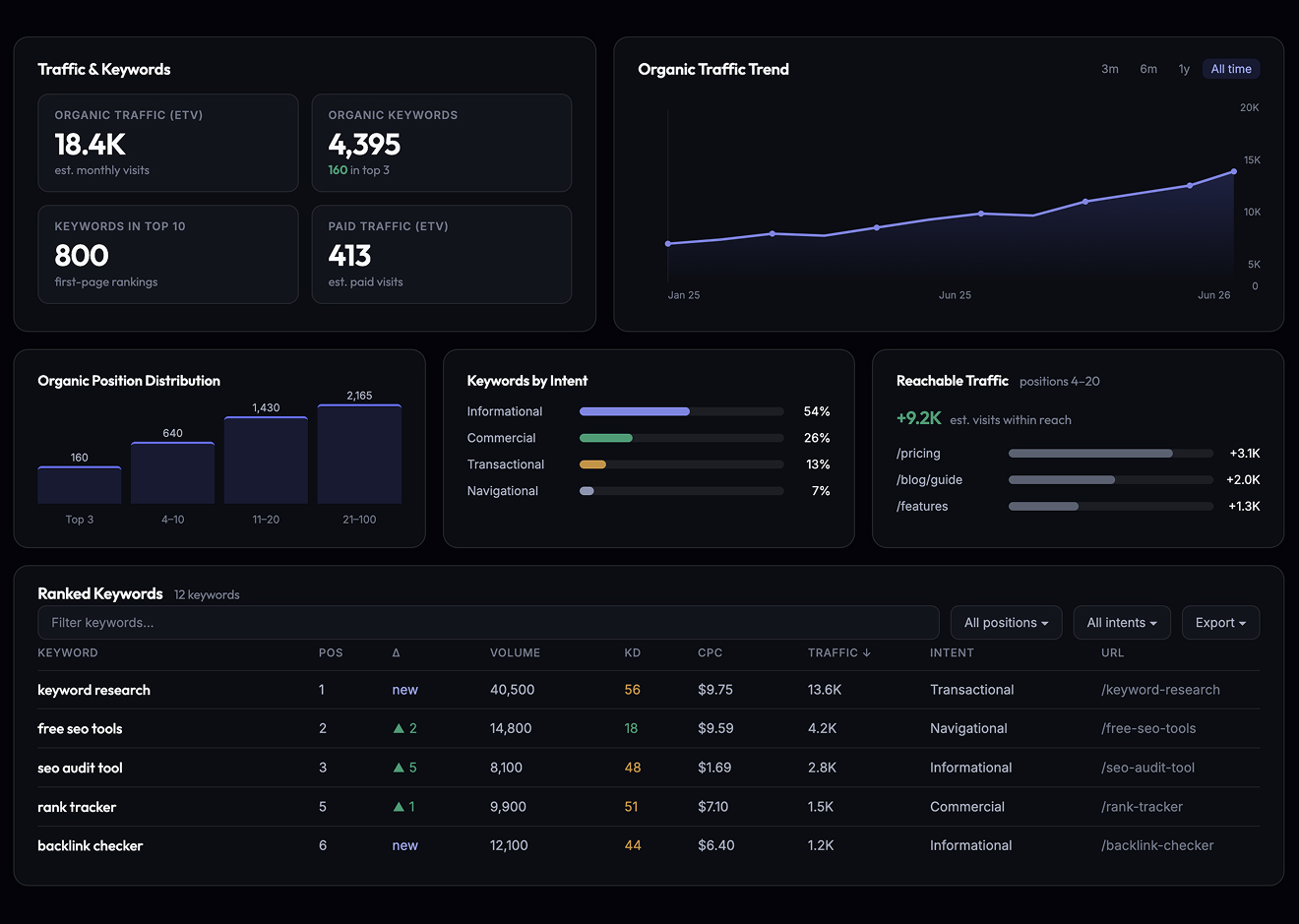
The store as one dataset: organic demand by country and intent, the categories that earn traffic, the competitors holding the queries that sell, and the authority behind each.

What you see
  • Where the store's traffic lands. Top pages by organic traffic and keywords, so you see which categories carry the store and which sell without any search demand behind them.
  • Demand by market and by intent. Traffic and keywords across countries, transactional vs informational split, and the queries at positions 4–20 with the traffic they'd earn in the top three.
  • The competitors holding your money queries. Keyword gap against your closest rival, traffic share, momentum, and Link Risk on a profile where money-keyword anchors pile up fast.
The dataset is the whole catalog, all indexed URLs, so a problem in one category doesn't hide behind a healthy sample.

AI Visibility Diagnostics

Shoppers ask AI what to buy. This module tracks which products and categories get you cited, and where competitors own the recommendation.

What you see
  • Whether your products are in the “best X” answers. Six AI engines queried on the questions buyers ask, “best”, “worth buying”, “vs”, with your products marked present or absent per engine.
  • Who AI recommends where you're absent, by category. Named competitors per query, share of recommendations per engine, and how they're mentioned: recommended, listed, criticised.
  • The category pages AI would cite, and the ones it skips. Freshness, dated content and source signals on your category pages against the pages engines currently pull from.
Each query is re-run three to five times per engine, so one lucky answer doesn't count as presence.
More in the platform Engineering tools for the scenarios where a mistake costs traffic: replatforming, headless storefronts, catalog pruning, post-update drops.
Internal Link Analyzer
Orphan pages, click depth, broken links, redirects, noindex and canonical mismatches across up to 5,000 URLs. Content links and navigation links are counted separately, because a link in the body and a link in the footer don't carry the same weight.
Pre-Migration Large Catalogs
JS-Rendered Crawl & Technical Check
Headless-Chrome crawl for React, Next.js and Vue sites, so you see links and content as Googlebot renders them on mobile. Per URL: indexability, Core Web Vitals and site speed, structured data, hreflang, AI-crawler access.
Headless Storefronts
Redirect Chain & Loop Inspector
Bulk detection of multi-hop redirect chains, loops and canonical conflicts across the URL map, up to 500 URLs per run.
Replatforming Catalog Pruning
Indexation Coverage Check
Indexed or not, URL by URL across the sitemap, in Google and Bing. The first thing to read after a drop.
Post-Update Drops
Schema Validation & Generator
Structured data validated per URL, and valid JSON-LD generated for 15 types with required and recommended properties checked as you type.
Product Schema Replatforming
Content Audit & AI-Footprint Scan
Each article graded on depth, E-E-A-T signals and genre fit; AI-generated share per page; keyword cannibalization and freshness across the whole blog. Keep, rewrite or delete, as a named list.
Large Catalogs Post-Update Drops
What You Won't Get

A revenue-page fix list, not a URL dump

A Typical Store Audit
The Neon Audit
What you getAn 80-page report: fix your meta descriptions and image alt text
What you getWhich problems are suppressing your revenue pages, URL by URL
The scopeA find-and-replace exercise across product templates
The scopeCrawl, indexation, catalog architecture, intent and product lifecycle
The formatA 200-row spreadsheet nobody can prioritize
The formatRevenue-page priority, P0 indexation to P3 hygiene
The measureOrganic traffic, search engine rankings, and Domain Authority
The measureCrawl efficiency, commercial visibility, and revenue pages
The question left open"Okay… but why isn't the store growing?"
The question answeredWhere your catalog loses visibility, clicks and revenue, and how to fix it
Deliverables

What you walk away with, priority-ranked

Three things leave the audit with you: a PDF priority list with the reasoning written out, an Excel workbook of catalog findings, and platform access to recheck any URL yourself.

01 P0 → P3

Revenue-Page Priority List

Each finding scored from P0 (indexation & revenue) down to P3 (hygiene), so you fix what moves money first.

02 Crawl & Index Map

Crawl & Indexation Blueprint

Which URLs to index, block, canonicalize or prune, with a faceted-navigation ruleset for your CMS.

03 Category & PDP

Catalog Architecture Plan

Search-driven taxonomy, category page briefs, and PDP templates with the attributes, schema and content blocks a product page needs to rank.

04 Lifecycle Rules

Product Lifecycle Playbook

Out-of-stock and discontinued logic (301/410, keep-page, alternatives) to preserve accumulated equity.

05 Real-Time Platform

Algorithm Platform Access

Live view of indexation, rankings and crawl coverage across the catalog on our Algorithm platform, yours during the audit and after handoff, so your team can verify any URL at source.

06 14-Day Async Support

14-Day Engineering Support

Two weeks of written engineering support after handoff, with direct Q&A with our Lead Architect while your team ships the fixes.

Process

How the engagement runs, four steps

Fixed scope. Clear timeline, typically 3–4 weeks. Engagements start at $1,500.

Step 1
Catalog Crawl & URL Classing
Search Console and analytics connected, then the whole catalog crawled, so each URL is classed as crawlable, indexed or wasted before any diagnosis.
Step 2
Demand Laid Over the Taxonomy
Keyword research at catalog scale, laid over your taxonomy: which categories, facets and product pages have a query behind them, and which demand has no page at all.
Step 3
Findings Scored P0 to P3
Findings from all modules scored from P0 indexation to P3 hygiene, with the revenue pages at the top of the list.
Step 4
Walkthrough & Ticket Hand-off
A live walkthrough with your team, then the tickets and CMS rulesets are handed over and two weeks of written support begin.
Frequently Asked Questions

Before You Ask

Most store audits are a find-and-replace exercise: fix meta descriptions and image alt text, then a checklist of technical SEO and on-page items with no order to it. We map search demand against the catalog as it exists and diagnose where crawl, indexation, intent and product lifecycle are suppressing the revenue pages.

Yes, and the checks are public: the ecommerce SEO audit guide walks through index decisions by URL class, crawl budget, facets, product lifecycle and the feed, with the checklist at the end. What the engagement adds is the whole catalog on Algorithm instead of a sample, and the findings scored by revenue page.

Usually 3 to 4 weeks. A catalog where the CMS generates hundreds of thousands of facet URLs sits at the longer end.

Yes. Shopify and Shopify Plus, Magento (Adobe Commerce), BigCommerce, WooCommerce, headless builds on Hydrogen or Next.js, or custom. Each platform generates URLs its own way, Shopify collections, WooCommerce filters, Magento layered navigation, so the tickets and CMS rulesets are written for the one you run, and your in-house team or agency can implement them as they are.

Yes, on the templates that carry revenue rather than as a sitewide average: category, product and checkout. Core Web Vitals and site speed are measured per template from a JS-rendered mobile crawl, and the fixes go into the dev tickets. What we don't do is treat speed as the diagnosis. A fast store with the wrong pages indexed is still a store Google ranks wrong.

An SEO audit, with the conversion path in scope where it explains the SEO. If organic traffic lands on a product page with a broken variant selector, or a checkout that fails on mobile, that shows up in the revenue-by-query data and we flag it. A user experience and conversion rate audit is a separate engagement.

Then the audit says so, with the numbers: what the fixes would cost against a rebuilt catalog architecture. Design, development and SEO sit in-house, so a rebuild keeps the URLs, rankings and links the store already has, with the same people who ran the audit.

Read-only access to Google Search Console and your analytics is enough. No admin, CMS or code access needed. Our crawler maps how your facets, parameters and product templates generate URLs directly from the live catalog, and we pull backlink and ranking data through our own Algorithm platform, so you don't need a paid Ahrefs or Semrush seat on your side.

You talk to the person doing the work

Direct Contact

Lead at Neon. Runs its ecommerce SEO audit services and built Algorithm, our in-house analytics platform. 10+ years in search & digital design.

Roman Makuev
Roman Makuev
Not sure if your store needs the audit?

Send us your URL. We'll take a first look and tell you whether an audit makes sense for where the store is now. If it doesn't, we'll say that too.