
An ecommerce SEO audit is a review of which of a store’s URLs search engines should crawl and index, and where ranking authority leaks between the pages that sell and the pages that never will. A regular SEO audit asks what’s broken on a page: title tags, site speed, a redirect chain. An ecommerce SEO audit asks the question the page-level view can’t see. Across the millions of URLs a store spins up, which ones should Google crawl, which deserve a place in the index of their own, and where is equity draining into pages that will never sell anything.
The scale is the whole problem. A store with 10,000 products generates a few million URLs. Twenty filters, three sort orders, pagination, session parameters: multiply them out and a mid-sized catalog generates a URL space Botify once measured, on a site with under 200,000 products, at more than half a billion pages a crawler could reach. Almost none of them should be in Google’s index, and the gap between what a store can generate and what deserves to rank is the subject of the audit.
Nine steps follow, each with the number that shows the finding, and the checklist version after them. Where a finding turns into a build decision, the step says so, because an audit that also designs the rebuild ends up a 60-page document nobody acts on.
What you need: Search Console on every property the store runs, including the old domains; a crawler that renders JavaScript (Screaming Frog or similar); a month of server logs; the platform’s inventory and on-site search exports; and GA4 landing-page revenue by URL pattern. A quick scan of steps 1, 2 and 5 on a mid-sized store takes a day. The full nine on a catalog over 100,000 URLs is two to three weeks, most of it waiting for crawls and index checks to finish.
Step 1. The URL-class inventory an ecommerce SEO audit starts with
A store is a system with four moving parts a content site doesn’t have: a taxonomy that branches into categories, subcategories and attributes, rendered as product listing pages (PLPs) and product detail pages (PDPs); a crawl-control layer deciding what bots reach; an index-control layer deciding what survives to rank; and underneath all of it, commercial intent, whether a given page maps to something a person searches for with a wallet open. An ecommerce SEO audit is mostly about the seams where the four disagree: the category that’s crawlable but shouldn’t be indexed, the product that’s indexed but reachable by no link, the filter that matches demand but was blocked by a rule written for a different filter.
The first step is therefore the list. Top-level categories, subcategories, PLPs, PDPs, then the machinery underneath: variant URLs, facet combinations, sort parameters, pagination, internal search results, regional copies. Each class gets one of five decisions: crawl and index it, canonicalize it to a parent, noindex it, block it outright, or leave it a pure UX state Google never sees. The triage sheet near the end is that list with the default decision per class, and the rest of the audit is finding every place the store departed from it without a reason.
Step 2. Index audit by URL class: sitemap against index, bloat, over-noindexing
The gap between what Googlebot can reach and what earns a place in the results is where ecommerce sites rot, and each of the five decisions has a readout in Search Console. A canonical Google didn’t accept reads as Duplicate, Google chose different canonical than user; pages blocked after they’d been indexed sit under Indexed, though blocked by robots.txt; facet junk that got crawled and rejected piles up in Crawled – currently not indexed. I read those three by URL template before anything else; in an ecommerce SEO audit the template is the unit, because the same status means different things on a PDP and on a sort parameter. Together they’re the map of where the site’s stated intent and Google’s decision diverge.
The XML sitemap is the site’s own statement of what it published, so it gets read against the index the same way, and what the platform puts in it is itself a finding. Shopify writes the product and collection sitemaps itself, lists every published product and collection, and gives no control beyond unpublishing or the seo.hidden metafield, so a product noindexed through a theme edit is still in the sitemap. Magento 2 generates one sitemap per store view, and with category paths in product URLs the same product carries a URL under every category it belongs to: the sitemap advertises one, the site links to several. WooCommerce under Yoast or Rank Math ships product tag and attribute archives by default, which on a store with 400 tags is 400 thin listing pages submitted for indexing on purpose. A sitemap URL that carries a noindex or canonicalizes elsewhere contradicts the sitemap in writing:
| What the sitemap does | How it reads in Search Console |
|---|---|
| Lists a URL you noindexed | Excluded by 'noindex' tag |
| Lists a URL that canonicalizes elsewhere | Duplicate, submitted URL not selected as canonical |
The share of sitemap URLs Google indexed, per template, is the fastest single number an ecommerce SEO audit produces for how far the store’s intent sits from Google’s decision.
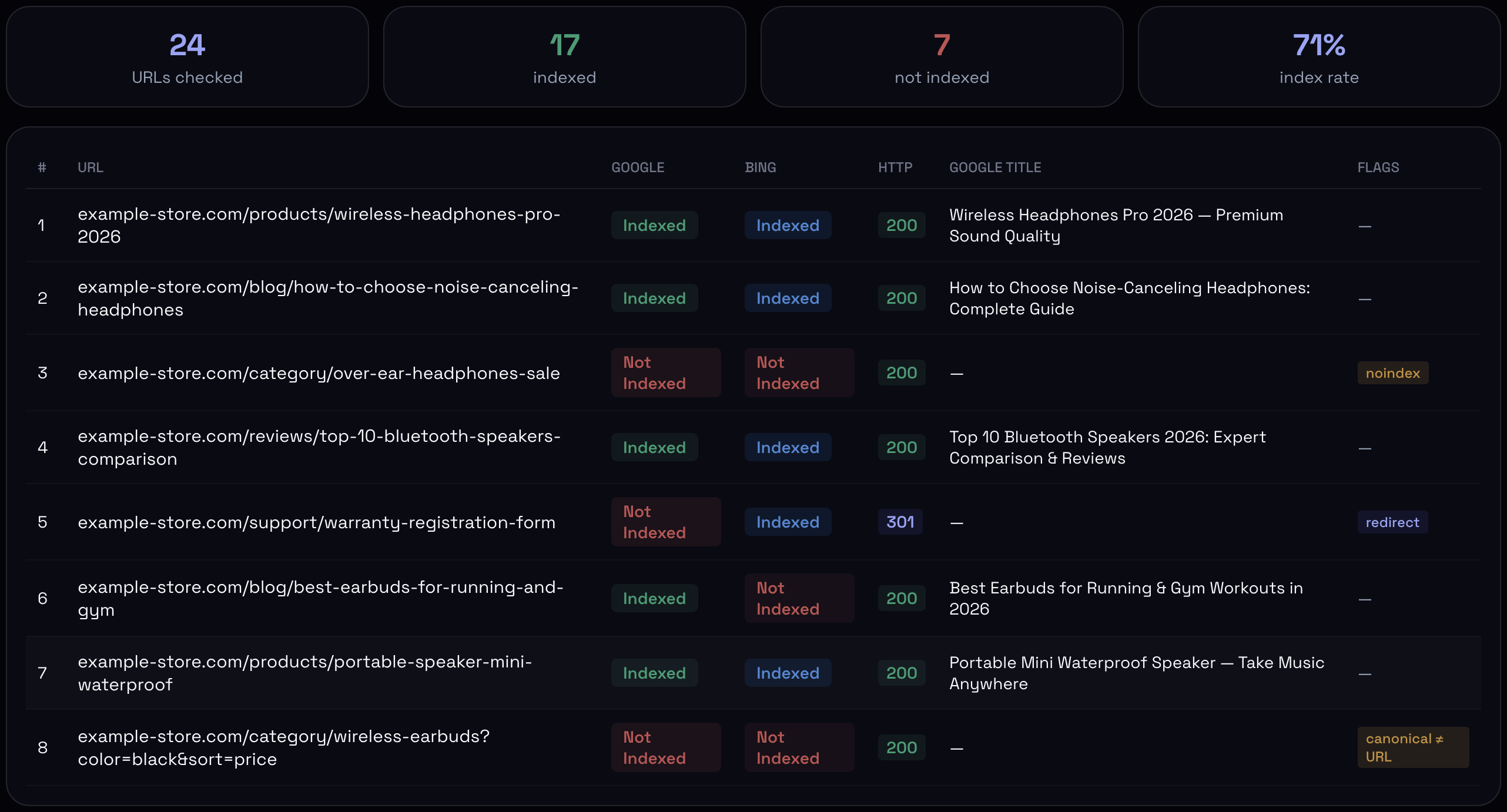
Bloat runs one direction far more often than the other. Color crossed with size crossed with brand becomes forty thousand thin, near-identical pages, every one indexable, every one competing with its own parent category for the same query. The reverse failure is rarer and more expensive: a facet matching demand, “waterproof hiking boots,” sitting behind a noindex someone applied with a broad brush. To read either I have to confirm what’s in the index class by class, and the tools for that are all partial. The site: operator can be off by an order of magnitude on a large store; the Search Console export caps at a thousand rows per reason, which on two hundred thousand excluded URLs is half a percent of the problem; the URL Inspection API is exact and capped at 2,000 requests a day per property. On a large store, then, you sample by template, two hundred URLs from each class, and read index status per URL across Google and Bing. The two engines rarely disagree on categories and disagree constantly on facets; where they disagree, the facets are usually the thin ones.
Step 3. Crawl audit: server logs by URL type
“Millions of URLs” is an abstraction until you watch where Googlebot spends its day. Google’s guidance names two tiers where crawl budget starts to matter: sites over a million unique pages with weekly changes, or over ten thousand pages with daily changes, plus any site where Discovered – currently not indexed keeps growing. Every store I audit crosses the second tier the moment faceted filters switch on. The catalog is 5,000 products; the URL space the bots see is five million.
Google’s July 2026 rewrite of that guidance changed two things for stores. Crawl capacity is now shared across all of Google’s crawlers per hostname: Googlebot, AdsBot and the Shopping fetcher draw from one pool, so a store running heavy Shopping campaigns has the ads crawler spending the budget the organic crawler needs, and a slow server throttles both. And HTTP caching became a lever: a 304 Not Modified for an unchanged page costs almost nothing, and most storefronts ship PLPs and PDPs without a usable Last-Modified or ETag, so every visit is a full 200 with a full render. The share of 304s in the Googlebot log lines is a number I now read on every ecommerce SEO audit, and on most it’s zero.
THE NUMBER THAT LANDS WITH CLIENTS
Screaming Frog’s analysis puts about 35% of a typical ecommerce site’s crawl budget on faceted URLs that return no SEO value: a third of everything Google will spend on you, poured into pages you’d never want ranked.
I read the split by segmenting the crawl with regex by URL type, and the patterns are platform-specific:
| Platform | Filters / facets | Sort | Pagination | Duplicates and junk |
|---|---|---|---|---|
| Shopify | filter.v.option.color=, filter.p.vendor=, filter.v.price.gte= | ?sort_by= | ?page= | ?variant=ID on every PDP; /collections/x/products/y for each product |
| Magento 2 | ?color=…&price=…&cat= (layered navigation) | ?product_list_order=, ?product_list_limit= | ?p= | category-path product URLs |
| Salesforce Commerce Cloud | ?prefn1=&prefv1= pairs | ?srule= | ?start=&sz= | ?dwvar_ variant parameters |
| WooCommerce | ?filter_color=, ?min_price=&max_price= | ?orderby= | /page/2/ | ?add-to-cart=ID; product tag and attribute archives |
| BigCommerce | theme- and app-dependent | ?sort= | ?page= | — |
The logs, and Crawl stats by Googlebot type
The logs come next, with the Googlebot hits verified against Google’s published ranges first, because fake Googlebot traffic is common enough on stores to distort the split, and cross-checked with the Crawl stats report, which breaks hits down by purpose and by Googlebot type. A mature store whose crawl is still mostly “discovery” rather than “refresh” is telling you the crawler keeps finding URLs it didn’t know about, and on a catalog that hasn’t grown, those are facets. The by-type breakdown puts AdsBot and the Shopping fetcher next to Googlebot Smartphone, and since the July rewrite that split is the first thing to read on a store running Shopping campaigns: it’s the organic crawler’s budget on the same chart.
The same logs give two more cuts: the share of hits landing on 3xx and 404, which on a store with lazy redirect rules runs into double digits, and the share of hits on URLs with two or more parameters, which is the facet grid by another name. AI crawlers now add to the same bill, and fetch far less efficiently: Cloudflare’s research with ETH Zurich found that most of what they request is unique long-tail URLs the cache never absorbs, which on a store is the facet grid. I don’t have a per-store number for how much of the crawl AI agents now take; Cloudflare’s data is network-wide, and the stores I’ve read logs for vary too much to average. Until there is one, the 403 rate by agent and the share of hits on two-plus-parameter URLs are the two lines in the log that stand in for it.
Regional and currency copies
A multi-store setup multiplies the space again. Each locale or currency copy regenerates every facet and variant URL, and without reciprocal hreflang the copies compete as duplicates. I check hreflang per template rather than per URL: return links on every copy, an x-default, and the canonical on each market’s page pointing to itself. The common mistake is every regional copy canonicalizing back to the flagship store, which hands every market’s rankings to one country; it reads as Alternate page with proper canonical tag stacking up on the non-flagship properties.
Step 4. Internal links on a store: orphan products and broken pagination
A product page reachable by no internal link is invisible to the crawler’s sense of importance, because nothing on the site votes for it; it sits there technically indexable and rarely ranked. Orphans are the internal-link finding that turns up most on a store, and they come in three shapes. The dropped product, removed from its category or never linked at launch. The pagination failure: a category on infinite scroll or lazy-load with no HTML pagination underneath, no <a href> a crawler can follow to page two, and since Google stopped using rel="prev" and rel="next" in 2019 the only thing that links page two is a link. And the inventory setting: WooCommerce’s “hide out of stock items from the catalog” removes a sold-out product from every listing while its URL keeps returning 200, so the product is orphaned the moment stock hits zero and re-linked when it’s replenished.
Googlebot renders with a tall viewport and neither scrolls nor clicks, so IntersectionObserver lazy-load usually fires and anything bound to a scroll event or a “Load more” click never does; everything in the catalog tail behind that scroll is orphaned at once. A crawl with JavaScript rendering on shows it plainly: the crawler reaches the first page of the listing, finds no href to page two, and comes back with a product count far short of what the store thinks is linked. Crawl depth comes out of the same graph. On a store with 24 products per page and 1,200 products in a category, the last product is fifty pages deep before any filter is applied, which is why head categories need subcategory links in the body as well as the mega-menu.
Step 5. Out-of-stock and discontinued products
Out-of-stock and discontinued products are where a store bleeds authority without anyone noticing, and where an ecommerce SEO audit does work no general audit does. Products go out of stock, products get discontinued, and on most stores both are handled by whoever built the platform with no thought to the page’s accumulated equity. Each platform has a default: Shopify keeps a sold-out product at 200 until someone unpublishes it, then a 404 with no 410 available without an app; Magento disables the product and returns 404, with the old URL rewrite still in the table pointing at nothing; WooCommerce trashes it to a 404 or, with the catalog-visibility setting, leaves it live and unlinked. From there the equity goes one of three ways: a hard 404, a blanket 301 to the homepage that Google classes as a soft 404, or a “temporarily out of stock” page a year after the product was discontinued, still indexed, still pulling a click that lands on nothing anyone can buy.
Temporary against discontinued
An ecommerce SEO audit separates the temporary from the permanent, because they route differently and the site almost always treats them the same. A temporary stockout leaves indexation alone: the page stays, the equity holds, and the structured data says so, with an Offer availability of OutOfStock or BackOrder. Schema.org also has Discontinued, PreOrder, SoldOut and LimitedAvailability, and almost no storefront emits any of them; the theme maps stock to InStock or OutOfStock and nothing else. A page that says “out of stock” in the copy and InStock in the schema loses the rich result and, on a Merchant Center product, gets the item disapproved for availability mismatch, because Merchant Center’s automatic item updates read the page’s structured data to correct the feed. How long counts as temporary depends on the category’s normal restock cycle. Past that, treat it as permanent.
To find them I run a custom extraction in the crawl on whatever carries the stock state, the “Sold out” button label, the availability meta, the JSON-LD Offer, cross it against the inventory export, and pull the referring domains and internal-link counts for every dead URL. That’s the number that says how much equity is on the table. The correct routing for each one, replacement model, parent category or a clean 410, is a build decision. The same referring-domain pull is the only backlink work the audit does, and the pattern repeats across stores: the homepage and the blog hold most of the referring domains, the categories that carry the revenue have almost none, and a measurable share of the links point at products discontinued two seasons ago. I map links by destination template and status code, so the store sees how much of what it already earned reaches a page that can still rank, which is a number to read before anyone proposes buying more.
Step 6. Faceted navigation and variant URLs
One variant model, matching the ProductGroup markup
One product in twelve colors and eight sizes can become ninety-six URLs, every color-size pair competing with the others and the parent for one query; facets do the same a level up, and Step 2 already counted them. Google gave variants a formal structure in February 2024 with ProductGroup markup, a parent carrying productGroupID and variesBy with a hasVariant array of Products, and it forces the site to pick a model. Single-page: one canonical URL for the group, variants preselected through a parameter that swaps image, price and availability; Shopify’s ?variant=ID is this model. Multi-page: each variant on its own URL with its own markup, and only when that variant carries its own demand; a phone case in one color has none, a mattress in one size does. The finding I see most often is neither. The URLs say multi-page, the schema says single-page, the color pages are self-canonical and the size pages canonicalize to them, and none of it agrees with what Search Console reports as the chosen canonical. When the URL model, the canonical and the structured data tell three stories, Google picks one, and it’s rarely the one the store wanted.
Which facets earn a page
For facets the dividing line in an ecommerce SEO audit is search demand. A filter combination people search, “black maxi dresses,” “women’s trail running shoes,” has its own intent, enough products and a clean landing, so it deserves an indexable page. A combination nobody searches, a three-filter stack, a sort order, a session parameter, splits signal and drains crawl. The platforms don’t make this easy in either direction: Shopify canonicalizes every filtered collection URL to the bare collection, which handles the junk and makes the one facet you want indexed impossible without a separate collection; Magento’s layered-navigation extensions that make filter URLs pretty and indexable make all of them indexable, so a store that wanted three landing pages gets three thousand. Google’s faceted-navigation guidance from December 2024 sets the conditions for the facets you keep: parameters joined with a standard ampersand, filter order fixed so one set never produces two URLs, and a 404 for any combination with no products rather than an empty grid at 200. For everything else it’s a robots block, one line per parameter family, or a URL fragment. A nofollow only works if every anchor to that URL carries it, and noindex is not a crawl-budget tool, since Googlebot has to fetch the page to read it.
The self-competing pairs give the problem away before any crawl does: a parent category and one of its own filtered states both ranking, badly, for one term. In Search Console that’s one query with two landing pages trading positions week to week, neither climbing. Google’s June 2026 spam update enforced the spam policies already on the books, scaled content among them, and a faceted grid churning out near-identical filter pages is that shape.
Step 7. Product and category pages: what thin content is on a store
An ecommerce SEO audit inherits a thin-content problem everyone agrees on and almost everyone misreads. The usual version goes: product pages run the manufacturer’s boilerplate, identical across every store selling the SKU, so Google penalizes it. Google deduplicates instead of penalizing, and deduplication is worse for the store. It groups the pages carrying that paragraph, the manufacturer, a marketplace, your store, and shows one, usually the most established. The page never ranks, and in Search Console it sits under Duplicate, Google chose different canonical than user with the canonical on a domain you don’t own.
For a product page the question is therefore whether it deserves original treatment, and that turns on demand. A long-tail product with no search demand of its own doesn’t need rewriting. A product people search for, where you’re losing the canonical to a marketplace, is where original content earns its cost. A product page ranks on the completeness of the product entity: variants declared properly, images the store shot itself, specifications, reviews that weren’t bought, shipping and return terms that read like a business. Google splits product rich results in two, and the audit checks which one each template qualifies for: merchant listings need price, priceCurrency and availability in the Offer, with shippingDetails and hasMerchantReturnPolicy for the annotations; product snippets need a review, aggregateRating or offers. A page with neither valid gets a plain blue link next to competitors with stars and a price. A GTIN that fails the GS1 check digit is worse than no GTIN: Merchant Center disapproves the item and the Product markup fails validation on the same field.
Category pages fail differently and matter more. Across roughly thirty retail sites in a seoClarity and JumpFly study, category pages ranked for 19% more keywords than product pages and drew 413% more traffic from them, because a category catches the broad search before the shopper has picked a SKU. A category is thin when it’s a grid with a title, or a grid with a wall of keyword text underneath to hit a word count. What a strong category needs is editorial context a shopper uses and the right assortment on the shelf. I check the assortment against the query: a “waterproof hiking boots” category whose first row is three non-waterproof models on sale is answering a merchandising rule, not the search. Below the head category runs the demand ladder, subcategory, then the filter and tag pages that each catch a slice of long-tail intent, and each rung that matches demand is a page worth having; each one that doesn’t is a page to canonicalize away.
Step 8. Demand map: keyword to URL, and where the links go
The demand side of an ecommerce SEO audit asks a question a crawler can’t: for every way a person shops the category, by attribute, use case, comparison, problem, is there a page built to catch that intent, indexable and ranking? The findings are consistent across ecommerce sites. A high-value intent with volume and no page. An informational blog post ranking where a category should, catching the visitor in the wrong context to sell to. Two pages splitting one intent, each too weak to win.
Three sources say more than the keyword tools do. Search Console queries with impressions where the landing page is a product or a blog post instead of a category: filter the Performance report to pages containing /blog/ or /products/, sort queries by impressions, and the commercial terms leaking onto the wrong template are the top of the list; the Search appearance filter for “Merchant listings” and “Product snippets” shows which pages earn the rich result. On-site search logs, specifically the zero-result searches, the cleanest signal there is of a shelf people expect and the store doesn’t have; in GA4 that’s view_search_results with search_term. And marketplace autocomplete, Amazon’s especially, which reflects how people phrase purchase intent before any SEO tool has caught up.
The map has a second column: pages that exist but nothing votes for. A strong commercial page starved of internal links while the blog hoards the equity everyone links to by habit. The crawl gives the count; the version that ranks the work is inlinks per template divided by revenue per template, which on most stores puts the blog at the top and the money categories at the bottom.
Step 9. Technical pass, and the product feed as a second index
The standard technical layer of an ecommerce SEO audit still gets checked, but the top ten cover it and I rarely find surprises, so it moves fast; the full method is in the technical SEO audit guide. Rendering: are the products in the DOM, or does the page ship an empty shell that fills after hydration. URL Inspection’s “view crawled page” against the rendered DOM answers it, and headless storefronts on Hydrogen, Next.js or Vue Storefront are where it shows up, with a crawled HTML tab that’s mostly script tags. Core Web Vitals read per template: PLPs fail LCP on the hero and the grid, PDPs fail INP on the variant selector, which on Shopify themes refetches the product section on every option change, and whatever the tag manager loads under it. Product, Offer, AggregateRating and BreadcrumbList present and valid on every template, since that’s what makes a product eligible for rich results at all. Canonical hygiene across the URL space.
The feed, Merchant Center and the AI shopping surfaces
A product that is in stock on the page and out of stock in the feed is invisible in four places at once: Google’s shopping panels, AI Overviews, ChatGPT’s product carousel and Perplexity’s shopping answers all draw on the Merchant Center feed, and none of them reads the page first. A 2026 study reported by Search Engine Land found 83% of the products in ChatGPT’s carousel came from Google’s top Shopping results. That ratio predates merchant-pushed catalogs and I expect it to loosen: OpenAI’s product feed spec under the Agentic Commerce Protocol takes a CSV or JSON the store refreshes on its own schedule, with price and availability required and variants grouped under group_id, and Google’s Universal Commerce Protocol is the parallel on its side. Either way the feed is a URL class of its own, with three checks.
Drift first. Does the feed match the page on price and availability, or have the two moved apart? A mismatch is a disapproval in Merchant Center and a silent drop from the AI surfaces, and the usual cause is a theme that updates the page in real time and a feed job that runs nightly.
Completeness second, on the SKUs that carry revenue rather than all of them: identifiers present and valid, titles written for the roughly 70 of 150 characters Merchant Center shows, product type and the variant attribute front-loaded, because a title that opens with the brand spends its visible half on the one thing the shopper already knows.
Access third, the check that didn’t exist two years ago. OpenAI runs three agents on one robots convention: GPTBot for training, OAI-SearchBot for the search index behind ChatGPT, ChatGPT-User for live fetches on a user’s request. A GPTBot Disallow written in 2023 and copied to all three opts the store out of the carousel. The CDN can do the same without a robots line: Cloudflare has blocked AI crawlers by default for new customers since July 2025, so robots.txt says Allow and the edge returns 403. The readout is the 403 rate by user agent in the same logs Step 3 used; a feed that passes Merchant Center diagnostics can still be unreachable to the agent that would quote it.
Ecommerce SEO audit checklist: the triage sheet
The ecommerce SEO audit checklist is fourteen rows, one per URL class. The second column is the default I expect to find; the audit is the list of places the store departs from it without a reason. Priority is the class of damage when it does: Revenue where the mismatch sits on a template that sells or holds equity, or cuts one off from the crawler, Crawl where it costs crawl and index room without touching a selling page directly, Hygiene where it’s wrong and cheap. The report below turns that into a number; the sheet is the version you can read in a meeting.
| URL class | Default decision | Where the mismatch shows | Priority | Owner |
|---|---|---|---|---|
| Top-level category | Index | GSC Pages report; sitemap coverage per template | Revenue | SEO |
| Subcategory / PLP | Index if it has its own demand | Duplicate, Google chose different canonical; queries landing on the wrong page | Revenue | SEO |
| Facet with search demand | Index; fixed parameter order; 404 when empty | Two URLs for one filter set; empty grids returning 200 | Revenue | Engineering |
| Facet without demand | Canonicalize to parent, or block | Crawled – currently not indexed by template; log share by URL type | Crawl | Engineering |
| Sort, session, tracking parameters | Block, or keep as fragment | Crawl stats “discovery” share on a static catalog | Crawl | Engineering |
| Pagination pages | Crawlable via HTML links; self-canonical | Crawler product count below catalog count | Revenue | Engineering |
| PDP with demand | Index; original entity data; valid Product / Offer | Rich-result eligibility per template; canonical lost to a marketplace | Revenue | Content |
| Long-tail PDP with supplier copy | Index, spend nothing on it | Rewrite budget spent on SKUs with no search demand of their own | Hygiene | Content |
| Variant URLs | One model, single-page or multi-page, matching the ProductGroup markup | URL, canonical and schema telling three stories | Revenue | Engineering |
| Out of stock, temporary | Keep; availability OutOfStock / BackOrder in schema | Copy and schema disagree; Merchant Center availability-mismatch disapprovals | Revenue | Content / feed |
| Discontinued | Route the equity, then 410 | Referring domains and internal links on 404 / 200-but-dead URLs | Revenue | Redirect owner |
| Internal search results | Block | Indexed /search?q= URLs; log share | Crawl | Engineering |
| Regional / currency copies | Self-canonical, reciprocal hreflang, x-default | Canonical pointing at the flagship store; Alternate page with proper canonical tag | Revenue | Engineering |
| Product feed | Matches the page: price, availability, identifiers; reachable by OAI-SearchBot | Merchant Center disapprovals; 403s by user agent in the logs | Revenue | Feed owner |
The ecommerce SEO audit report: prioritized by revenue, with an owner per finding
A flat list of 137 issues sorted by severity is a technical export, and it launders a crawler’s sense of “critical” into yours: a tool flags facet bloat on a dead category as critical and an indexation gap on the best-selling category as medium, and hands you the dead category first. The report inverts that. Every finding carries one number, the URLs it touches multiplied by the share of organic revenue that template earns, with the revenue share pulled from the GA4 landing-page report grouped by URL pattern, so two findings can be compared without arguing about adjectives. Findings sort by impact against effort, so the store knows what to do Monday. And every finding names its owner: facet rules are engineering, duplicate content is content, equity routing belongs to whoever owns redirects. Leave that off and it lands on nobody’s desk. The issue count goes in an appendix.
Ecommerce SEO audit FAQ
How often should a large ecommerce store be audited?
For a catalog over 10,000 URLs, a full audit once or twice a year, because the structural decisions, index buckets, facet rules, variant model, don’t change month to month. What changes fast is the log file: crawl allocation and parameter spikes want checking monthly, and that’s monitoring.
Should faceted filter URLs be blocked in robots.txt or set to noindex?
Neither, for most of them: canonicalize the filtered URL to its parent and let the robots block cover only the parameter families that never carry demand, sort, session, price ranges. Block before indexing, noindex after, never both at once. On Shopify the platform already canonicalizes every filtered collection, so the only question left is which facets deserve a collection page of their own.
How should out-of-stock and discontinued products be handled?
Per product, and the input is the referring domains and internal links the dead URL holds. A product with links and ranking history gets routed to the replacement model or parent category; one with neither gets a 410 and drops out of the sitemap. Temporary stockouts stay live with the availability in the schema matching the copy, because Merchant Center reads the page to correct the feed, and a store that routes them like discontinued products loses the ranking it would have kept through the gap.
Should a store block GPTBot, ClaudeBot or OAI-SearchBot?
The agents do three different jobs, and a rule written for one hits the others. Blocking the training crawlers costs nothing in Google, ChatGPT search or Perplexity; blocking the search crawlers takes the store out of the product carousel; the live-fetch agents open a page when a person asks, and most stores want that. A CDN setting can refuse an agent the robots file allows, so the robots line is half the answer.
| Job | OpenAI | Anthropic | Perplexity |
|---|---|---|---|
| Training | GPTBot | ClaudeBot | — |
| Search index | OAI-SearchBot | Claude-SearchBot | PerplexityBot |
| Live fetch on a user’s request | ChatGPT-User | Claude-User | Perplexity-User |
What tools does an ecommerce SEO audit need?
Beyond what the lead lists, two APIs: URL Inspection for index status by template and CrUX for vitals by template. Ahrefs or Semrush help on the demand side, as one input next to on-site search logs and marketplace autocomplete.
If you’d rather have this run on your store than run it yourself, that’s what our ecommerce SEO audit services cover.