A growing share of your customers ask ChatGPT for recommendations instead of Googling. This is how to find out whether it's recommending you — and how it's describing you when it does.
When a customer wants a recommendation today, a growing share of them don’t open Google. They ask ChatGPT. “What’s the best project management tool for a small team?” “Which CRM should I use?” “Who makes good running shoes for flat feet?” And ChatGPT answers — with a short list of named brands.
If your brand is on that list, you’re in the conversation. If it isn’t, you’re invisible to that customer, no matter how well you rank on Google. So the obvious question is: how do you actually check what ChatGPT says about your brand?
It sounds simple. Open ChatGPT, ask, read the answer. But if you do it that way — once — you’ll walk away with a conclusion that’s probably wrong. This article explains why, and how to check ChatGPT brand mentions in a way that actually holds up.
A quick note on where this comes from. My name is Roman Makuev — I run an SEO agency and I own a tool called Algorithm. We started looking into this because clients kept asking the same question — “what is ChatGPT saying about us?” — and we couldn’t give them a reliable answer. So we went looking for the best tools to track ChatGPT brand mentions, tried what was out there, and found that most of them had the same flaw: they checked once and reported the result as fact. None of them were honest about how unreliable a single check is. In the end we built our own AI tracker to do it properly. I’ll explain the flaw they all shared, because understanding it is the whole point — whether you use our tool or just check manually.
There are several AI assistants now — Perplexity, Gemini, Claude, Grok. They all matter to some degree. But for brand visibility, ChatGPT is in a different weight class.
The numbers make the case. ChatGPT has around 900 million weekly active users and processes over a billion queries a day. More importantly for marketers: it accounts for roughly 82% of all referral traffic that comes from AI platforms. When people talk about “AI search,” they’re mostly talking about ChatGPT, whether they realize it or not.
And here’s the part that should get your attention. Roughly half of ChatGPT usage is people asking for recommendations and advice — not coding help, not essay writing, but “what should I buy / use / hire.” That’s your customers, in the buying mindset, asking a machine for a shortlist. When ChatGPT cites sources, it typically references only one to three websites. One to three. That’s not page one of Google with ten results and a long tail. That’s a podium with three spots.
So the stakes of “does ChatGPT mention my brand” are higher than they look. You’re not fighting for position seven. You’re fighting to be one of three names that even get said out loud.
Here’s where most people — and most tools — go wrong.
You open ChatGPT, type “best CRM for small business,” and read the answer. ChatGPT names HubSpot, Salesforce, and Zoho. You note it down. Maybe you screenshot it. You conclude: “OK, we’re not showing up, and these three are.”
Then you close the chat. And that conclusion is unreliable, because of one fact about how ChatGPT works that changes everything: ChatGPT is not deterministic.
Google is deterministic. Search the same thing twice in a row and you get the same results. ChatGPT doesn’t work like that. It generates each answer fresh, sampling from a range of possibilities as it writes. Ask the exact same question twice, in two separate chats, and you can get two different lists of brands — different names, different order, different reasoning.
This isn’t a bug. It’s how the technology works. But it means a single check tells you almost nothing.
I tested this myself to be sure. I asked ChatGPT “best CRM for small business” three times, fresh chat each time, same account, within a few minutes:
| Run | Brands ChatGPT named |
|---|---|
| 1 | HubSpot, Salesforce, Zoho |
| 2 | HubSpot, Pipedrive, Monday.com |
| 3 | Salesforce, HubSpot, Freshsales |
Look at what happened. HubSpot showed up all three times. Salesforce showed up twice. Pipedrive, Zoho, Monday.com, and Freshsales each showed up exactly once.
Now imagine you’d only run that check once. If you saw Run 1, you’d report that Pipedrive has no ChatGPT visibility — wrong. If you saw Run 2, you’d report that Salesforce isn’t showing up — also wrong. One check, one screenshot, and you’ve built a strategy on a coin flip.
So don’t check once. That’s the whole fix — check the same question several times and look at what’s consistent across the runs.
Say you ask ChatGPT the same thing five times and your brand lands in all five answers. That’s a real result, you can take it to the bank — ChatGPT genuinely associates your brand with that query. Show up in one run out of five and it’s the opposite: noise, a lucky sample, nothing to build on. What you’re really measuring isn’t any single answer. It’s how often your brand survives across repeated answers. One run is one sample of that. You need several to see the actual number.
That’s the thinking behind how we built brand tracking into Algorithm. It’s also why the tool has a control most others don’t bother with — you decide how many passes to run before it starts:
| Passes | What it’s good for |
|---|---|
| 1x | A quick peek. Fine when you’re just exploring, useless for decisions — whatever it returns, treat it as a hint and nothing more. |
| 3x | Where a real answer starts. Three runs catch most of the swing between samples, which makes this the setting for routine monitoring. |
| 5x | For anything headed into a report or a strategy call. Five runs settle into a stable enough pattern that you can actually act on what you see. |
Simple way to decide: about to tell your boss or your client something based on the result? Run 5x. Just poking around for yourself? 1x is fine — as long as you don’t mistake it for a fact.
Here’s what the setup looks like in the tool — the multi-pass selector is right there in the form:
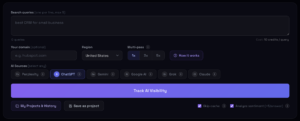
You enter your queries, pick how many passes, and let it run. You can do the same thing manually in ChatGPT — open a fresh chat, ask, note the result, repeat. It’s tedious by hand across many queries, but the method is identical. The point isn’t the tool. The point is: never trust a single run.
So far we’ve talked about presence — are you in the answer or not. But presence is only half the story, and this is the part most guides skip entirely.
When you track brands on ChatGPT properly, you’re looking at three things, not one.
Are you mentioned. The basic yes/no, measured across multiple runs as a stability score. Five out of five is strong. One out of five is noise.
Where you’re mentioned. ChatGPT answers are ordered lists. Being named first is not the same as being named sixth. The first one or two brands get most of the reader’s attention — by the time someone reaches name number six, they’ve often already decided. Position matters, and a good check records it.
Who you’re mentioned with. Every time ChatGPT answers a recommendation query in your category, it’s effectively publishing a competitive set. The brands that appear next to you, run after run, are the competitors ChatGPT considers your real peers. That’s genuinely useful intelligence — sometimes the list isn’t who you’d expect.
Presence, position, and competitive set — that’s what “tracking brands on ChatGPT” should actually mean. Anything that only gives you a yes/no is leaving most of the value on the table.
Now the question that barely any tracking guide bothers to ask, and it might matter more than presence does.
When ChatGPT mentions your brand — what is it actually saying about you?
A mention isn’t automatically a win. ChatGPT doesn’t just rattle off names, it describes them as it goes. Your brand might come out as “a solid, reliable choice trusted by larger teams.” Or it might come out as “a cheaper option, though users say the support is slow and the interface feels dated.” Both of those count as mentions. The second one is quietly losing you customers — the person asked for a recommendation and got, in the same breath, your name and a reason to skip you. A mention wrapped in a bad description is worse than no mention at all.
So this is something we deliberately built into the tool: you see the context and sentiment of each mention, not just the fact of it. Whether ChatGPT framed you as positive, neutral, or negative, and the actual words it used. That matters because what you should do depends entirely on which of four situations you’re in.
If you’re mentioned positively and it holds up across runs, the job is to protect that. Figure out which sources are feeding the good description and keep them healthy — don’t let a strong position quietly erode.
If you’re mentioned but the tone is flat, or your name is buried near the bottom, that’s actually an opening. ChatGPT knows you exist, it just hasn’t been given a strong reason to push you. Close that gap with better positioning and content and you can move up.
If you’re mentioned negatively, treat it as urgent. Something in ChatGPT’s sources is feeding that description — old reviews, a stale comparison article, a Reddit thread that ranks well. Track it down. Fix the source, and the description shifts over the following weeks.
And if you’re not mentioned at all, that’s a visibility problem, not a wording problem. No clever prompt gets you in. Your brand simply isn’t part of ChatGPT’s mental map of the category yet, and building that presence is a longer game.
Here’s the same four situations as a quick reference — what each one means and what it should push you to do:
| What ChatGPT does | What it means | What to do |
|---|---|---|
| Mentions you, positive tone, across most runs | You have a real, healthy position | Protect it — find the sources feeding the good description and keep them strong |
| Mentions you, but flat tone or buried low | ChatGPT knows you, just isn’t sold on you | Close the gap with sharper positioning and content; this is a winnable opening |
| Mentions you, negative tone | A bad source is shaping the description | Urgent — track down the source (old review, stale comparison, Reddit thread) and fix it |
| Doesn’t mention you at all | You’re not in ChatGPT’s picture of the category | Visibility problem — a longer game of building presence, not a prompt tweak |
One thing if you’re checking by hand: read the entire sentence ChatGPT writes about you, not just whether your name is in it. The description is the part that actually tells you something.
Two more practical things worth knowing when you check.
ChatGPT’s answers about brands come from a mix of what the model learned during training and, increasingly, live web results it pulls in. When it does pull live results and cite sources, those citations tell you which pages are shaping its opinion of your category. That’s a direct, actionable list — those are the pages to influence if you want the answer to change.
And ChatGPT answers differently depending on region. Ask “best accounting software” from the US and from the UK and you can get different brand lists, because the model accounts for local context. If you sell in multiple markets, a check from one country isn’t a check for all of them. Our tool lets you set the region for exactly this reason — but even checking manually, be aware that your result is location-specific.
You don’t need any tool to start. Here’s a method you can run right now.
Pick three questions a real customer would ask — not keywords, actual questions. Something like “best [your category] for [type of customer],” “is [your brand] or [competitor] better,” and “what [your category] tool do people recommend.”
Open ChatGPT, start a fresh chat, ask the first question. Write down: which brands were named, in what order, and — importantly — what ChatGPT said about each one. Then open a brand-new chat (not the same one — a continuing chat carries context and skews the result) and ask the exact same question again. Do it a third time.
Now look at your three runs. Did your brand appear all three times, once, or never? When it appeared, was it near the top or near the bottom? And what words did ChatGPT attach to it?
That’s a real check. It takes about fifteen minutes for three queries, and it will tell you more than any single-screenshot “AI audit” floating around. If you want to do it at scale — more queries, more passes, multiple regions, tracked over time — that’s what a dedicated tool is for. But the logic doesn’t change. Check more than once, watch the position, and read the adjectives.
ChatGPT has become one of the main places your customers form opinions about brands — including yours. The good news is that it’s not a black box. You can see what it says. You just have to check it properly: more than once, in context, and paying as much attention to how you’re described as to whether you’re there at all.



